Live card previews
Directory
A building directory: tenants, departments or people with their floor and suite, in a table that pages by itself.
Wayfinding
Large destination arrows with walking times for lobbies, corridors and campuses.
Pin map
Place numbered destinations on your supplied map or floor plan.
Room board
Every meeting room in a building at a glance: free, starting soon or busy now, until when, and the rest of the day as a slim timeline.
Parking Guidance
Direct drivers to available spaces by level or zone.
Amenities
Show amenities in a clear icon grid, with their hours and what is open now.
What is wayfinding?
Wayfinding is everything that gets a visitor from the door to the right room without asking anyone. It answers four questions in order, and each has a screen that fits it.
| The visitor asks | What answers it | Ready-made app |
|---|---|---|
| Where am I? | A floor plan or site map with a "you are here" marker | Pin map |
| Who or what is where? | Tenants, departments or people, with their floor and suite | Directory |
| Which way do I go? | Large arrows with walking times | Wayfinding |
| Is this the right room? | A sign on the door, or one board for every room | Meeting room and Room board |
Signs and maps are part of it, and so are colour, symbols and where you put them. A screen adds the one thing paper cannot do: it changes when the building does.
A digital building directory
The Directory app lists tenants, departments or people with their floor and suite, in a table that pages by itself. It holds up to 200 listings, sorts them A to Z or by floor, and keeps each page up for the number of seconds you choose. A floor can be a number or any words, such as Ground or Lobby, and the Floor and Suite labels can read Level and Room instead.
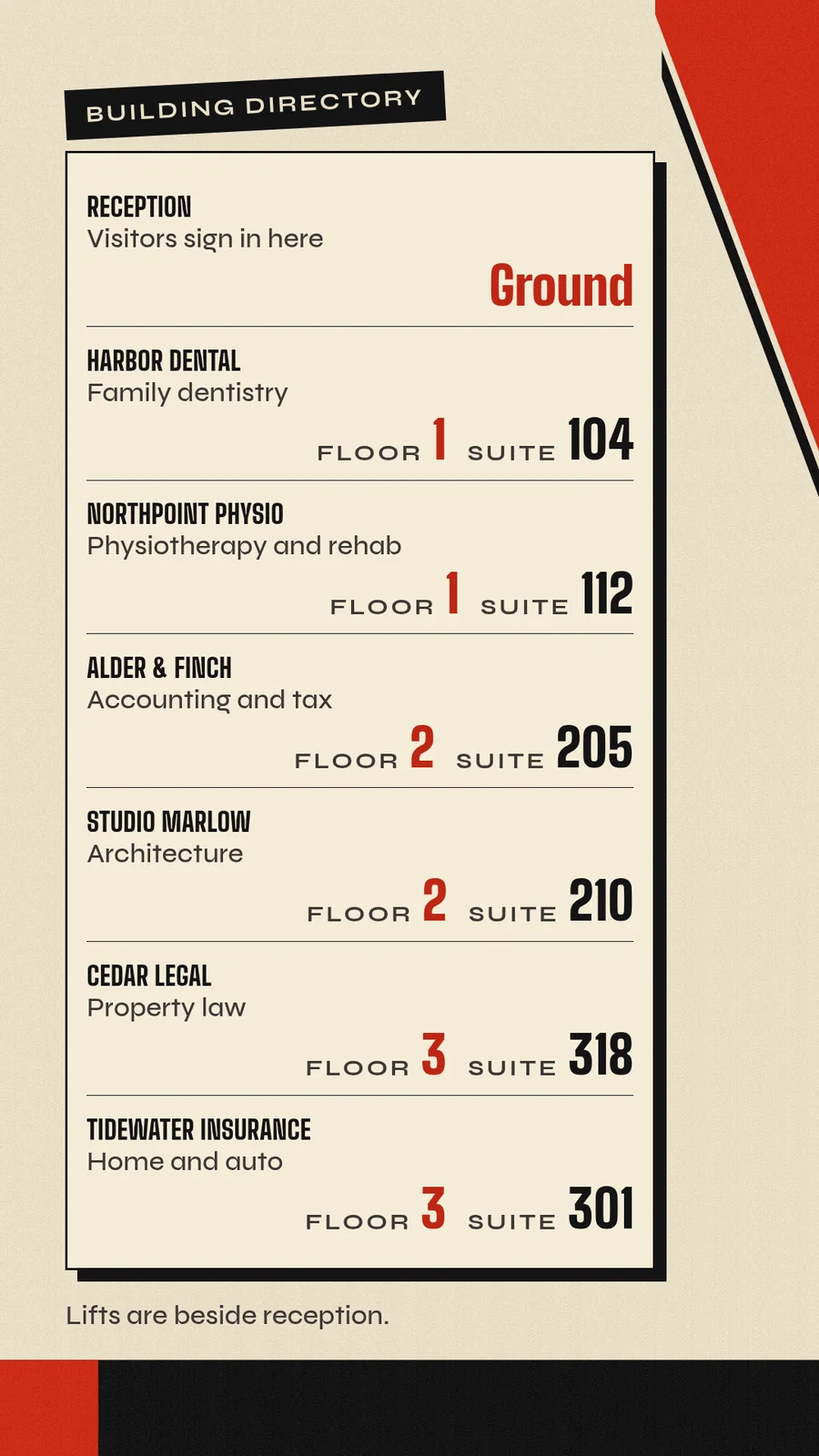
The listings are the app's data, so a change reaches the screen without republishing the playlist. Hand your agent the tenant list as a spreadsheet, a PDF or a photo of the old board, and it reads it with its own access.
- You
Alder & Finch moved to suite 214 on floor 2, and Tidewater Insurance has left. Update the lobby directory.
- Agent
Done. Alder & Finch now shows floor 2, suite 214, and Tidewater Insurance is off the list. I did not republish the playlist.
Arrows and walking times
Wayfinding puts large destination arrows on the screen, each with a walking time. A sign holds up to 8 destinations. Each has a direction (ahead, left, right, back or the diagonals between), a walking time in minutes or a distance in metres, and an optional note such as a level, a landmark or an accessible route. The sign can say "You are here" and order its destinations as listed, nearest first or A to Z.
The sign fits its content. A few destinations stand larger, one or two on a portrait screen become a big sign with the arrow above the name, and seven or eight on a landscape screen set in two columns.
Arrows depend on where a screen hangs, so give each screen its own page: the screen at the entrance points to the lifts, and the screen at the lifts points back. Your agent supplies each direction and distance, and the app draws them. It does not plan routes.
A floor map with pins
Pin map puts numbered pins on a floor plan or site map you supply. It takes up to 64 pins, a "you are here" marker and a note for each pin. Pins that sit close together share a number, a legend beside the map pages through the names and notes, and the pin it describes is highlighted. A closed destination stays on the map, marked closed.
The marker is where you put it. Nothing tracks a visitor. For a campus, put the site map on the screen at each gate, number the buildings and write each building's hours in its note.
Campuses, offices and clinics
- Campuses and schools. A pin map at each gate, arrows at each building entrance and a room board in the buildings with the most rooms. The campus and schools pages show the rest of the screens.
- Offices. A directory by the lifts, a room board on each floor, a Desk board for free desks by zone and a Visitor sign-in code at reception. See corporate offices.
- Clinics and hospitals. A directory by department, arrows with an accessible route in each note, and a queue screen in the waiting room. See waiting rooms.
- Venues and shopping. A pin map with the Amenities and Nearby apps for what is open and what is around the corner.
Rooms, parking and amenities
Wayfinding does not stop at the lobby. These apps keep the answers current while people are moving through the building.
| The visitor needs | App | What it shows |
|---|---|---|
| A free meeting room | Room board | Every room in a building, free, starting soon or busy, until when, with the rest of the day as a slim timeline. It takes up to 60 rooms, and meeting titles stay hidden unless you turn them on. |
| The room in front of them | Meeting room | Available or in use in huge type, until when, what is next and the day's timeline. The meeting room page shows one. |
| A free desk | Desk board | Free, booked, occupied and unavailable desks by zone. Booking names stay hidden unless you enable them. |
| A place to park | Parking guidance | Free spaces by level or zone, with route arrows and full or closed signs. Your priority order picks the recommendation, and counts that are stale or offline stay unknown. |
| What is open | Amenities | An icon grid with each amenity's hours and what is open now. |
| The map on their phone | QR code and Concierge | A code to scan that opens your own map or venue guide. That page runs the rest. |
Your agent reads the booking system with its own access and sends the rooms and bookings.
Touch kiosks or static maps?
A static map is cheap and never breaks, so it still suits what never changes: the shape of the building and the way to the exits. Exit and safety signs stay as your local rules require, and a screen sits beside them.
A screen earns its place where things change: a tenant moves, a lift is closed, a room is booked, an event sends visitors round the back. Choose by what the visitor has to do.
| Option | Suits | In screenRIG |
|---|---|---|
| A static map or sign | What never changes | Keep it |
| A screen that plays on its own | Directories, arrows, floor maps and room boards that visitors read | The apps above, on any Player |
| A touch kiosk | Visitors who tap to search or choose | A small app your agent writes for an Android or BrightSign screen. The Player starts at power-on and keeps the app in front, and each tap reaches your agent as an event. |
The kiosk software page shows how a touch app is built, changed and counted.
Which screens run it?
Every Player draws these apps full screen, in landscape or portrait, so a directory can hang upright by the lifts or flat above reception. Use a TV or stick with Android TV, a Raspberry Pi (its page shows an upright directory), a Windows or Linux PC, a Samsung or LG signage display, a BrightSign player or any browser. The Player guide lists them all.
Wayfinding questions
What is the difference between wayfinding and signage?
Signage is the objects. Wayfinding is the job they do together: getting someone from the door to the right room. A directory is one sign inside a wayfinding system.
Does it plan routes or give turn-by-turn directions?
No. Your agent supplies each direction, distance and walking time, and the apps draw them. When a route changes, a closed lift or an event detour, tell your agent and the arrows change.
Can the directory list people instead of businesses?
Yes. A listing is a name with a line under it, such as a trade, a department or a role, and a floor and suite. Your agent only receives the names you give it.
Can visitors search the directory on the screen?
The Directory app pages through every listing by itself. For a screen visitors tap, your agent builds a touch kiosk app, as on the kiosk software page.
How many screens can show the same directory?
Every screen you put it on. Screens that show the same directory show the same listings. Tag screens by building or floor, and one request changes every screen with that tag.
Put a directory in your lobby
Start free, pair the lobby screen and send your agent the tenant list. Ask for a screenshot before you walk away.
Related
More topics
screenRIG is free.
Install the official plugin, pair a screen and your agent publishes to it.