What does headless mean for digital signage?
In a traditional signage system the web app is the control surface and the player follows it. In a headless system the control lives in an API. Any client calls the same control plane, the control plane decides what each Player plays, and the Player renders it and reports back. The dashboard is one more client, and no client needs to stay open for a screen to keep playing.
| Concern | Headless CMS | Headless signage platform |
|---|---|---|
| What it holds | Structured content entries | Media, playlists, ready-made apps, your own apps and key/value state |
| Who renders it | Your own front end or player | The Player on each screen |
| Scheduling and takeover | A separate system on the screen side | The server decides what each screen plays |
| Proof the screen showed it | A separate system on the screen side | Screenshots and play records |
| Use it when | The same content also feeds a website or an app | The screens are the channel |
Programmable means code controls what plays. Programmatic usually means automated buying of ad slots on out-of-home screens, which Players covers separately.
A release board that a pipeline drives
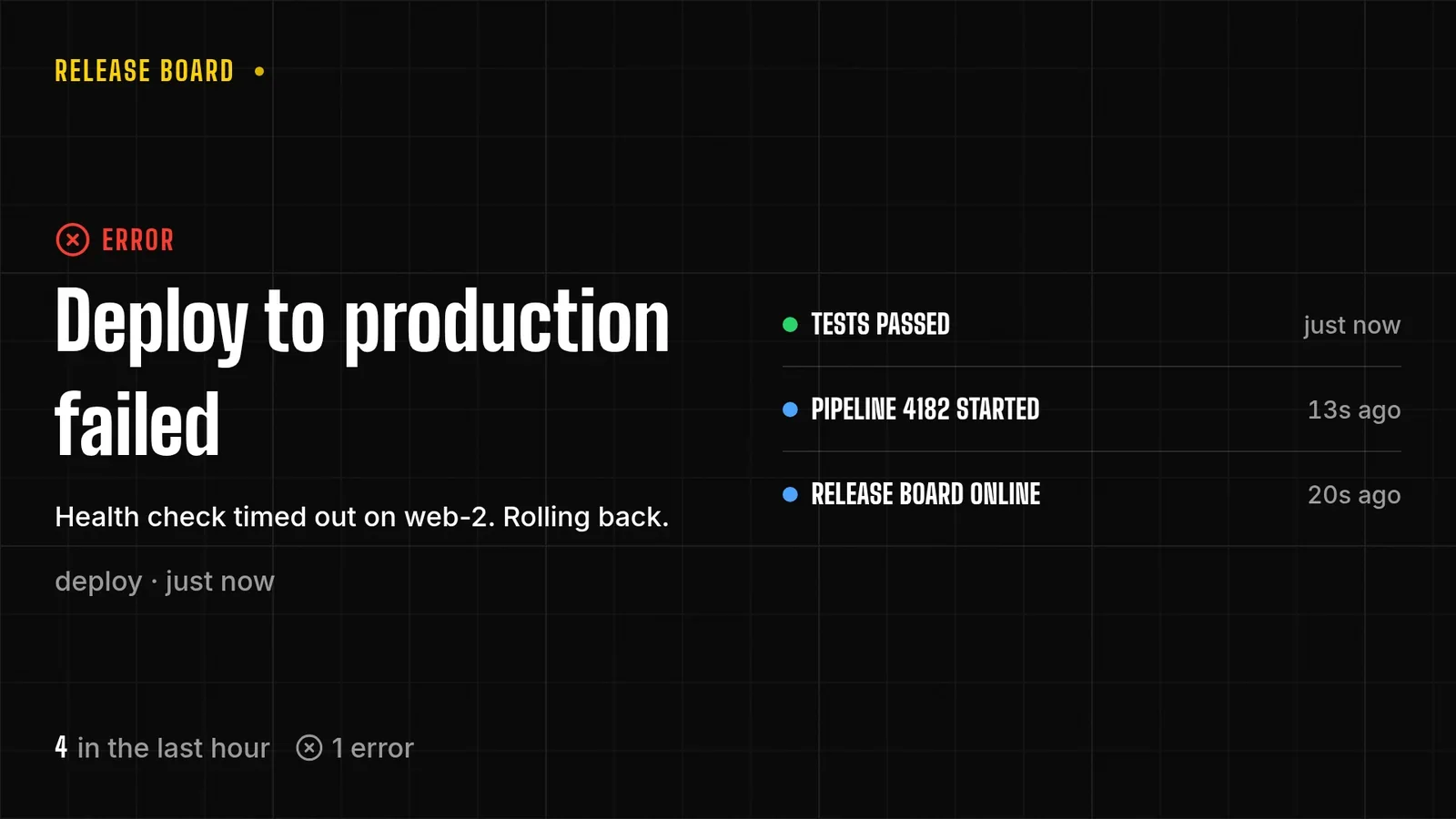
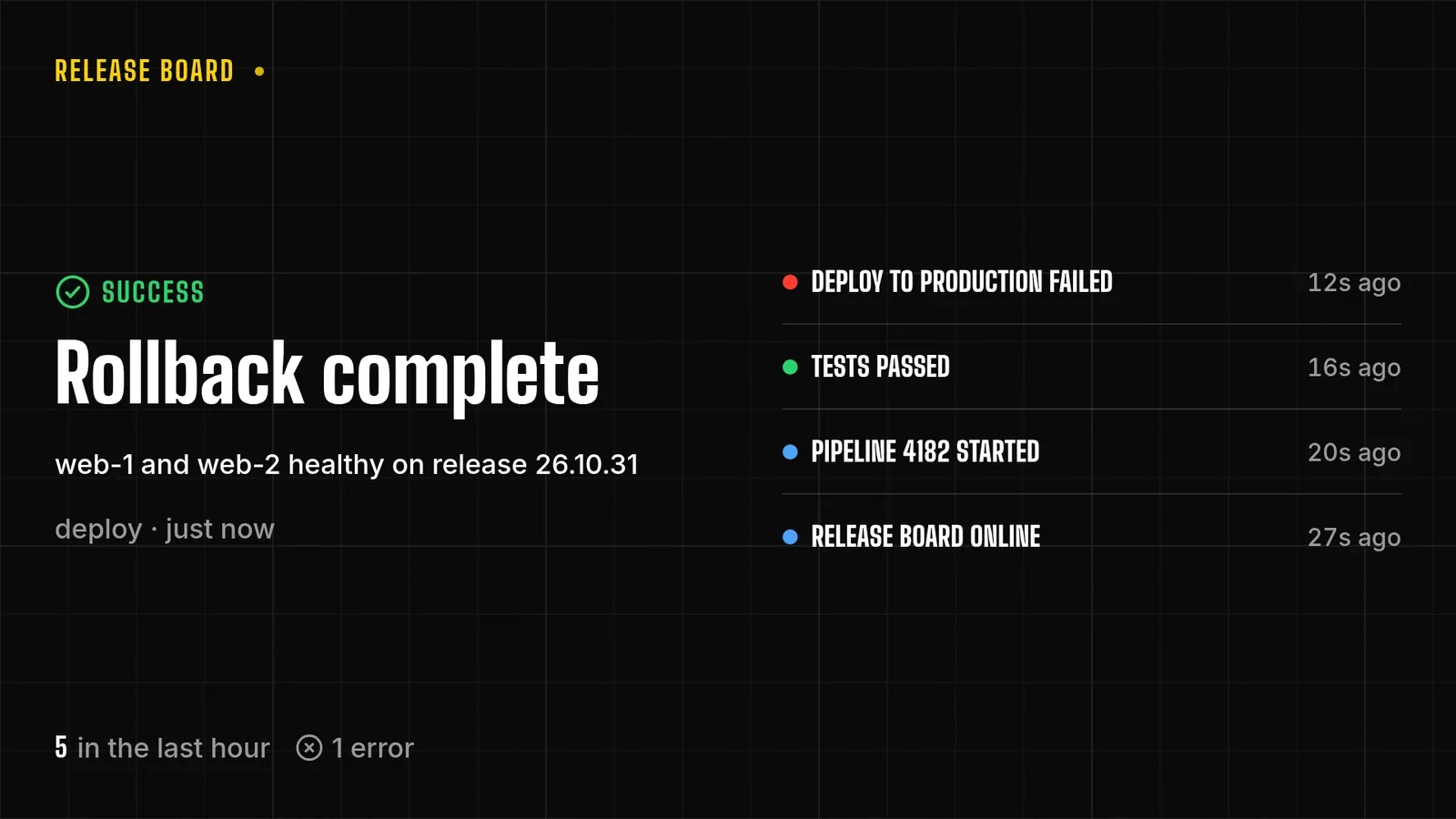
The platform team wants its release pipeline on the TV by the coffee machine: each step as it happens, newest first, with a red row when something fails. The pipeline, its job numbers and hosts are demo content. The run is real: 26 October 2026, on screenRIG's staging environment, with the pictures drawn by the Player in a browser window standing in for the TV. Each pipeline stage runs a small script once:
- Pipeline started. main, 3 commits.
- Tests passed. 412 tests in 3 min 10 s.
- Deploy to production failed. The health check timed out on web-2, rolling back.
- Rollback complete. web-1 and web-2 healthy again.
After the third step the error is the big row, the earlier steps are listed with their ages, and the foot counts the hour's events and errors. After the fourth the rollback is on top and the failed deploy sits below it.
What does the pipeline's script do?
The agent's part is short and happens once. It makes an Activity feed board, gives it a first row so the page is not empty and puts it on the screen. Then it hands the pipeline a script. The script reads the board and its revision, puts the new row first, and writes it back only if nobody wrote in between:
# $url is the board's address and $auth carries your token.
# 1. Read the board and its revision (the ETag).
etag=$(curl -sS -D - -o current.json -H "$auth" "$url" | awk 'tolower($1) == "etag:" { print $2 }' | tr -d '\r')
# 2. Write the board back with the new row first. A stale revision is refused, and the script reads again.
curl -sS -X PUT "$url" -H "$auth" -H "Content-Type: application/json" -H "If-Match: $etag" -H "Idempotency-Key: board-$(date -u +%s%N)" --data @next.jsonHow does the pipeline know the screen has it?
It does not poll. The project's event stream is replayable, and a pipeline can read it as it writes. For the failed deploy, the stream carried the write, the change, and then the Player's own report that it had applied that revision to that page (times in UTC, trimmed to event and revision):
03:43:47.501  kv.updated                 revision 5 written
03:43:47.505  screen.card_data_changed   revision 5
03:43:49.306  screen.card_data_applied   revision 5, page "board"
The Player reported the revision 1.8 seconds after the write was accepted. A job that must not continue until the screen shows a failure can wait for that last line, and a job that does not care can ignore it. Screen events are free on the listen stream, and a reconnect resumes from the last cursor.
Two writers, one revision
Two jobs can write at once. A write that carries a stale revision is refused, and the refusal says which revision is current, so nobody overwrites a newer row. The script reads again and retries, up to three times.
What stays server-side in headless digital signage?
Everything that has to keep working when no client is connected. The Player renders; the server decides.
| Concern | What the server does |
|---|---|
| Schedules | Picks what each screen plays: its takeover, else the first schedule entry that matches the screen's local time, else the assigned playlist. Switches land within about a minute of a boundary. |
| Takeover | Puts one playlist on a screen or a tagged fleet ahead of schedules and assignments, then ends on its own. |
| Display power | Holds when each display is on. The Player evaluates the schedule on the device, so it keeps working offline. |
| Proof of play | Records every visible start of an image or video. A CSV export covers up to 31 days. |
| Device health | Players report their health regularly, and at once when the display connection or power changes. |
A tag selects a fleet, so one command reaches every screen carrying it. A fleet command is billed as one request however many screens it reaches.
When do I still want the dashboard?
The dashboard is one more client, and some jobs suit a person.
- Reviews. An agent signed in at Propose access, or a project that requires review, sends changes to the Reviews page. A person approves, requests changes or rejects, and nothing reaches a screen before that.
- Access. The Access page lists every agent, connected app and service client, and a person ends any of them there.
- People and projects. Invitations and project settings belong to people.
Frequently asked questions
Is headless digital signage the same as API-first digital signage?
They describe the same design from two sides. API-first means the API is designed first and every client uses it. Headless means no particular interface is required to run the screens.
Do I need a developer to run headless digital signage?
No. An agent can run it from a sentence, and a person approves what it proposes when the project requires review. A developer adds scripts like the one above when a system should write to a screen by itself.
Can I keep my content in another system?
Yes. A script reads the system and writes the values to a board. The screens render what the server holds.
Which Players does a headless setup drive?
Ten: the web Player, Android and Google TV, the Amazon Signage Stick, Apple TV, macOS, Windows, Linux, Raspberry Pi, Samsung Smart Signage (Tizen) and BrightSign. The Players guide has the install steps.
Is headless digital signage free?
screenRIG is free. Pay only if you want more: more than 50 screens, people to talk to, contract terms, custom work or a lot of storage. Pricing lists every allowance, and Developers shows each interface.
Write your first row
Read the REST API reference for the calls the script makes, or start free and let your agent write the script.
Related
screenRIG is free. Pay only if you want more.
Install the official plugin, pair a screen and your agent publishes to it.