Live card previews
Menu board
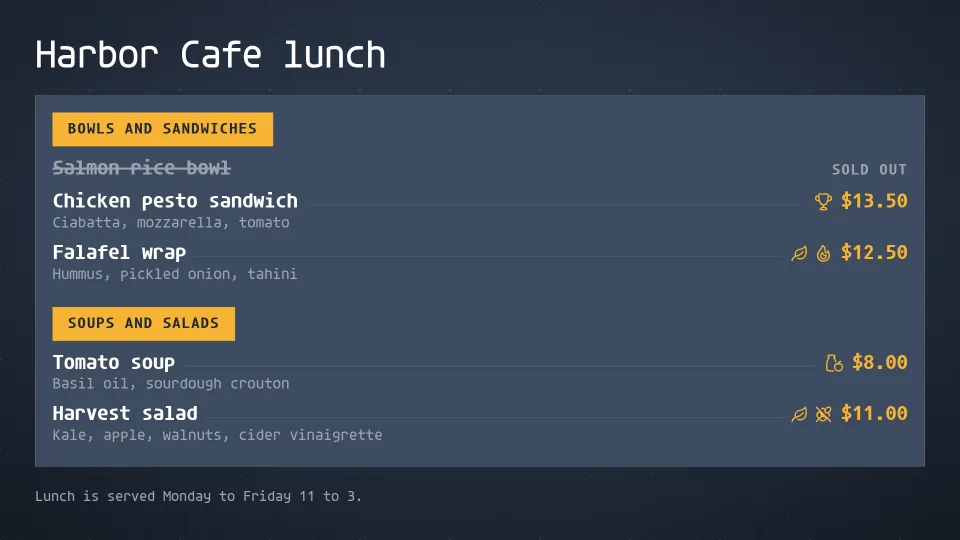
A menu board that sets itself: sections, prices with hairline rules, dietary marks and sold-out items, flowing into as many columns as it needs.
Daily specials
Show today's featured dish and price, with the whole week alongside.
Combo meals
The numbered meal deals of a quick-service board: photo, what is in each combo, the price with the saving, the upsize step and the calories.
Price matrix
Place items down the side and sizes across the top, with a price where they meet: coffee, taps, wine, dispensary weights and fuel, plus add-ons.
Text
Words on screen with an optional eyebrow, headline and footer around the main body.
QR code
Any action as a crisp, scannable code on its own card: a link, a call, Wi-Fi, a contact, an event or an app store link.
Which screen goes in the window?
Any TV or tablet that can run the screenRIG Player, an app that shows a code you read to your agent. Pick what already fits your truck:
| Screen | Where the Player comes from | Read this |
|---|---|---|
| An Android tablet, or a TV or stick with Google TV or Android TV | Google Play | Android TV and Google TV |
| An iPad | App Store | The Downloads page |
| A Fire TV Stick or an Amazon Signage Stick | Amazon Appstore | Fire TV Stick and Amazon Signage Stick |
| A Raspberry Pi or a small Linux PC | One install line | Raspberry Pi |
| A Windows PC | Microsoft Store | Windows |
| Any screen with a modern browser | Nothing to install | The web Player |
A window that faces the sun needs a bright display, and a display that suits a shop counter may wash out in daylight. screenRIG runs on whichever screen you choose, so choose the display for the light first. Boards come in landscape and portrait, so the screen can hang either way.
Do I need a food truck menu template?
No template to fill in. Give your agent the menu as typed text, a photo of the chalkboard, a PDF or a spreadsheet, and it builds the board. The Menu board app does the layout: it sets the largest type that fits, so a short menu stands big and centred, three dishes or fewer stand as a feature, and a long menu flows into columns and turns pages on its own. Pick one of nine styles, or ask your agent to use your logo and photos.
A truck usually needs a few boards, each an app your agent places and fills:
| App | What it does on a truck |
|---|---|
| Menu board | The main menu, with sections, prices, dietary marks and sold-out items. |
| Daily specials | Today's dish and price, with the week beside it. A dated exception replaces the regular dish. |
| Combo meals | Numbered meal deals, with a photo, what is in each one and the saving. |
| Price matrix | Drinks or sides by size, with add-ons. |
| Text | Where you are today and until when. |
| QR code | A link to your socials, your order page or your catering form. |
Food truck menu ideas that fit a board
A window board is read in a few seconds by someone in a line, so what you leave off matters as much as what you put on. These ideas suit any cuisine:
- Keep the main menu short. As few dishes as your kitchen can serve quickly. A short menu gets big type, and a long one turns pages, which a person in a line may not wait for.
- Lead with the dish you want to sell. Put today's special first, with a photo if you have one.
- Name your combos. A numbered combo is quick to say at the window. The Combo meals app shows each one with its price and the saving.
- Mark what people ask about. The Menu board app shows dietary marks beside a dish, and the Allergen matrix shows the declarations you supply, by item.
- Say where you are. A line with today's spot and closing time saves the question and tells passers-by you are open.
- Refresh with the season. Ask your agent to put the summer menu up on the day you pick, and it takes over on its own.
Change prices, specials and sold-out items in a sentence
Your menu and the screen's playlist are separate, so a change to the menu reaches the screen without republishing anything. On our menu board page, a sold-out mark reached a test screen a few seconds after the change.
| You say | What happens |
|---|---|
| "The fish taco is sold out." | It is struck through and marked sold out. |
| "Fish tacos are back." | The mark comes off. |
| "Raise the bowl to $13." | The new price shows on the board. |
| "Today's special is the mango habanero chicken." | The special changes. |
| "We're parked at Pier 9 until 8 tonight." | The location line changes. |
| "Switch to the dinner menu at 5." | The dinner menu takes over at 5. |
If your trucks' stops live in a calendar or a sheet your agent can read, ask for a routine, and it updates the location line each morning from there.
Does it work when the signal is poor?
A truck's connection comes and goes, and the board is built for that. The Player downloads your content once and plays it from the device's own storage, so a dropped network does not stop it. A change you send while the screen is offline waits and goes live when the screen reconnects.
The one thing to do first is connect the screen to a network once, so the Player can download your menu. After that it plays on its own. On a TV or stick with Google TV or Android TV, the Player also starts again by itself after a power cut once you allow Display over other apps, so shutting the generator off at night and starting it in the morning needs no one to open the app. The Android TV page walks through that setting, and the onn. Google TV page records what happened when we cut a real stick's network.
Set it up in three steps
- Install the official screenRIG plugin in your agent. Start has the step for each agent.
- Put the Player on your screen and open it. It shows a pairing code.
- Read the code to your agent and send it your menu.
Food truck menu board questions
Can I use a tablet or a regular TV?
Yes. An Android tablet, an iPad, or any TV with a stick or small PC behind it can run the Player. A TV that has Google TV or Android TV built in needs nothing extra.
Does it take orders or payments?
No. A menu board shows the menu. For a touch screen that visitors tap, see kiosk software.
How many screens can I run?
As many as you have. Every plan has unlimited screens. A truck with two windows can show the same board on both, or a different board on each.
What does a food truck menu board cost?
The screen is the thing you buy. screenRIG is free, with unlimited screens. Paid plans add business tools, more people, people to talk to, governance and contract terms. See pricing.
Can I show my menu from my till?
Connected sources can keep the Menu board app in step with a Square, Shopify or Toast catalogue, so a price change or a sold-out mark in the till reaches the screen. Data sources explains how sources work, and pricing lists the plans that include them.
Put your menu in the window
Start, pair a screen, send your agent your menu and ask for a screenshot before the line forms.
Related
More topics
screenRIG is free.
Install the official plugin, pair a screen and your agent publishes to it.