Live card previews
Emergency message
Full-bleed alert from preset messages, sent fleet-wide with screen takeover.
CAP alert
Emergency and public alerts from your CAP sources, in the sender's own words, most severe first.
Public alerts
Active alerts for a place from official feeds, most severe first, in the theme's safety colours.
Safety counter
Days without a lost-time incident, counted from the date of the last one, with the record streak and the goal.
Safety signs
Place a clear safety symbol and message where people can read them.
Outdoor Safety: Lightning & Heat
For people outdoors, supplied lightning and heat at a glance: a 30-minute all-clear countdown, a nearby-lightning watch and the WBGT heat level, filling the screen while lightning is in range.
Three ways to raise an alert
| Source | Who sends it | What the screens show | How it ends |
|---|---|---|---|
| Your emergency notification system | Everbridge, Rave, Alertus, an IPAWS relay or any system that sends CAP 1.2 | A full-screen card in the colour of the alert's severity, with the event, headline, description and instruction | The alert expires, or the system sends a cancel or an all-clear |
| A notice your agent starts | A person, by asking their agent | An Emergency message with ready-made wording, or your own title and text | Its time runs out, or you say it is over |
| A bar or takeover from a sensor or tool | A system that posts a few words, such as Home Assistant, a sensor hub or an alerting tool | A bar over what is playing, or a full takeover | Its duration passes, or the sender clears it |
Every alert targets screens by tag, so a notice reaches the floor, the building or the campus it is for, and nothing else. When an alert ends, each screen returns to what it was playing before.
An alert from your emergency notification system
Your agent creates a trigger for a tag or a list of up to 500 screens and gives you its address, username and password. You enter them in your emergency notification system as a CAP 1.2 destination with HTTP Basic authentication. An organization can have up to 20 triggers.
- Each alert is a full-screen card. It uses the colour of the alert's severity and carries the event, headline, description and instruction.
- It holds as long as the alert says. It stays until the alert's own expiry, or a default you choose from a minute to 7 days, and never longer than 7 days.
- Updates redraw it. A new alert replaces the one showing, and a cancel or an all-clear returns every screen to what it played before.
- Exercises are marked. An exercise carries an EXERCISE banner. Test, system and draft messages are ignored, and so is a repeat of a message already received.
- A screen needs a default playlist to be taken over. Screens without one are skipped, and the trigger's report names them.
- You can test it. Your agent runs a 60-second exercise on the real screens, reads what each alert did, and ends one early if you ask. For each alert the report counts the screens targeted, taken over, cleared, skipped and failed, and it retries a failed screen.
A trigger can also read public alert sources itself. Your agent gives it up to five CAP or Atom feeds, or a location, and it checks them once a minute, so the most severe matching alert takes the screens over like one your system sent. CAP alert triggers lists every option, and Alerts take over the glass is the short version.
A drill or a notice you start yourself
A notice you start yourself is made ahead of time and waits, assigned to no screen. The Emergency message app has ready-made wording for evacuate, lockdown, shelter-in-place, severe weather, medical and all clear, written to be read in a hurry, and a custom notice takes your own title and text.
- You
Go.
- Agent
The notice is on every screen tagged hallway: "Shelter-in-place drill. This is a drill. Stay in your classroom and wait for your teacher's instructions." It plays ahead of the bell schedule for three minutes, and I recorded why: shelter-in-place drill.
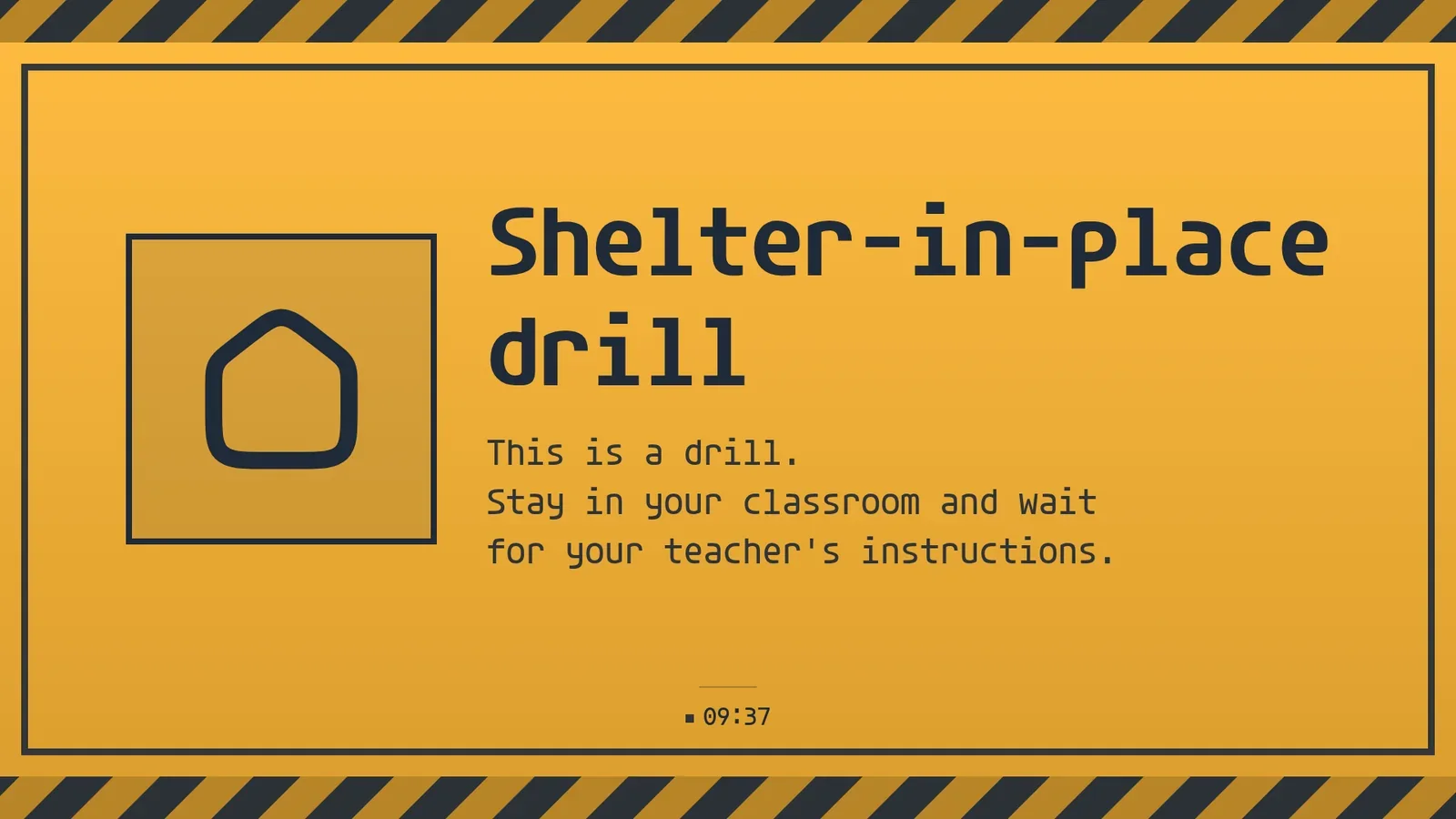
That run is from screenRIG's test environment on 26 October 2026, with one screen, so one screen answered. With more, every screen carrying the tag gets the notice and reports its own result. A takeover lasts up to 7 days, or until you end it.
- You
The drill is over.
- Agent
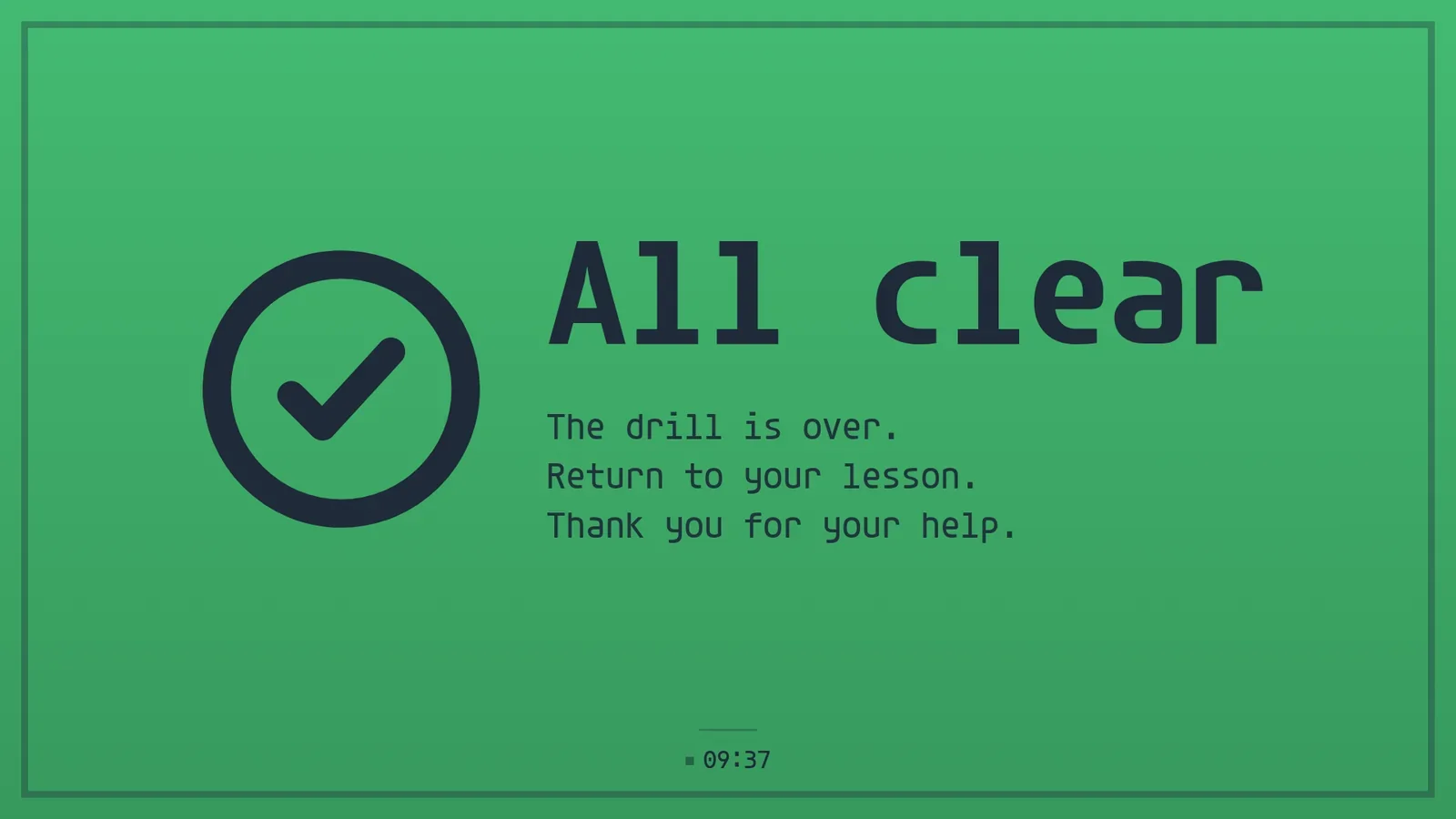
The hallway screens now say "All clear. The drill is over. Return to your lesson. Thank you for your help." in green.
- Agent
And they are back on the bell schedule and the announcements. The log keeps when the drill started and why.
Dayparts and takeovers explains how a takeover ranks above a schedule and hands the screen back.
A school alert system
A school or a district can run all three on the same screens: the notification system sends CAP alerts to the screens tagged for each building, the office starts a drill by chat, and the hallway screens go back to the bell schedule afterwards. Digital signs for schools shows the whole hallway, and digital signage for universities covers campus alerts.
A bar or a takeover from a sensor or a tool
Some alerts come from a machine, not a person. An overlay trigger gives any system an address to post a few words to: a title, a message and how long to show it, or a clear. The trigger's screens show it as a bar along the top or bottom edge of what is playing, or as a takeover, until it expires or the sender clears it.
- You
When the loading door sensor reports the door open, show "Loading door open" as a red bar on the dock screens, and take it off when the door closes.
- Agent
Done. I made an overlay trigger for the screens tagged Dock, shown as a bar along the bottom edge. The sensor hub posts to its address when the door opens and clears it when the door closes. I ran the 60-second test, and the bar showed on both dock screens.
A bar leaves the page underneath playing, and a takeover fills the screen. Each trigger keeps a log of the posts it showed, ignored or refused, so a sensor that stops posting is easy to spot.
Public weather and safety alerts in the regular loop
Not every alert needs a takeover. The Public alerts app shows active alerts for a place from official feeds, most severe first, in the safety colours of the theme. The CAP alert app shows alerts from your own CAP sources in the sender's own words, with a long alert shown in parts so nothing is cut off. You set the place, the lowest severity, the languages and whether the card stays on screen with a calm status when no alert applies. Either can fill the screen, sit in a corner or run as a band along an edge, so a weather warning rides along with the normal pages. Outdoor safety adds lightning and heat for people outdoors.
Safety boards: days since the last accident, records and messages
An alert is for the moment something goes wrong. A safety board is for every other day.
| You want | App | What it shows |
|---|---|---|
| A days since last accident sign | Safety counter | Days without a lost-time incident, counted from the date of the last one, with the record streak and the goal |
| A safety scoreboard | Scorecard and Huddle board | Actuals against targets with signed variance and status, and Safety, Quality, Delivery, Cost and People in one daily view |
| A safety sign | Safety signs | A mandatory action, prohibition, warning or first-aid symbol, with its instruction, detail and location |
| Safety messages of the day | Quote and Announcement | One message per local day or a rotation, each in large type |
| Heat and lightning for outdoor crews | Outdoor safety | A 30-minute all-clear countdown, a nearby-lightning watch and the WBGT heat level |
A safety record sign is the Safety counter with a title and a goal. Your agent sets the date of the last incident, the record and the target, and the sign counts the days on its own. When an incident happens, the safety lead tells your agent the new date.
Inspirational safety messages work best when they are about your own hazards. Ask your agent for a month of short messages in your plant's own words, such as the forklift rule or the lockout step, and the Quote app shows one a day with an attribution you choose. Manufacturing facility signage shows these boards together with production and andon.
What an alert screen does not do
An alert screen is visual. It supports the alarms, sirens, paging and public warning systems you already have, and it does not replace them. A screen is silent unless you add background music, and an alert does not use sound. Your emergency notification system stays in charge of what is sent, to whom and when.
Emergency alert questions
Does it replace our emergency notification system?
No. Your system stays in charge. It sends CAP alerts to a trigger, and the screens show them. Bells, sirens, paging and your procedures stay as they are.
Which systems can send an alert?
Any system that can send a CAP 1.2 alert by HTTP POST with Basic authentication, such as Everbridge, Rave, Alertus or an IPAWS relay. Each trigger has its own address, username and password.
Can I raise an alert from a button or a phone?
Ask your agent in chat, which starts a notice for any tag. A device or system that can send an HTTP POST can raise an overlay trigger, so a door sensor or a monitoring tool can put a bar or a takeover on the screens you choose.
What if a screen is offline?
The trigger's report lists the screens it targeted, took over, skipped and failed, and it retries a failed screen. A screen with no default playlist is skipped. Check the report after an alert, or after an exercise, so you know which screens answered.
Which screens can show an alert?
Any screen with a Player: a TV with Google TV or Android TV built in, an Amazon Signage Stick, a Raspberry Pi, a Mac, a Windows PC, a Samsung or LG signage display or any browser. Players lists them.
Can an alert show in more than one language?
The CAP alert and Public alerts apps take your preferred languages. A notice you write yourself is your own text, so write it in each language you need.
What does an emergency alert system screen cost?
screenRIG is free, with unlimited screens. Paid plans add business tools, more people, people to talk to, governance and contract terms. See pricing.
Try an exercise on one screen
Start, pair one screen and ask your agent to make a trigger for it. Then run the 60-second exercise and watch the screen take the alert and give it back.
Related
More use cases
screenRIG is free.
Install the official plugin, pair a screen and your agent publishes to it.