An office wall, from one message
This is a real session on a test screen, run on 27 October 2026. The company, the names and the numbers are made up, and they were sample data. With your own agent they come from the tools it is already connected to, such as your help desk and Slack. screenRIG connects to none of them: your agent does the reading.
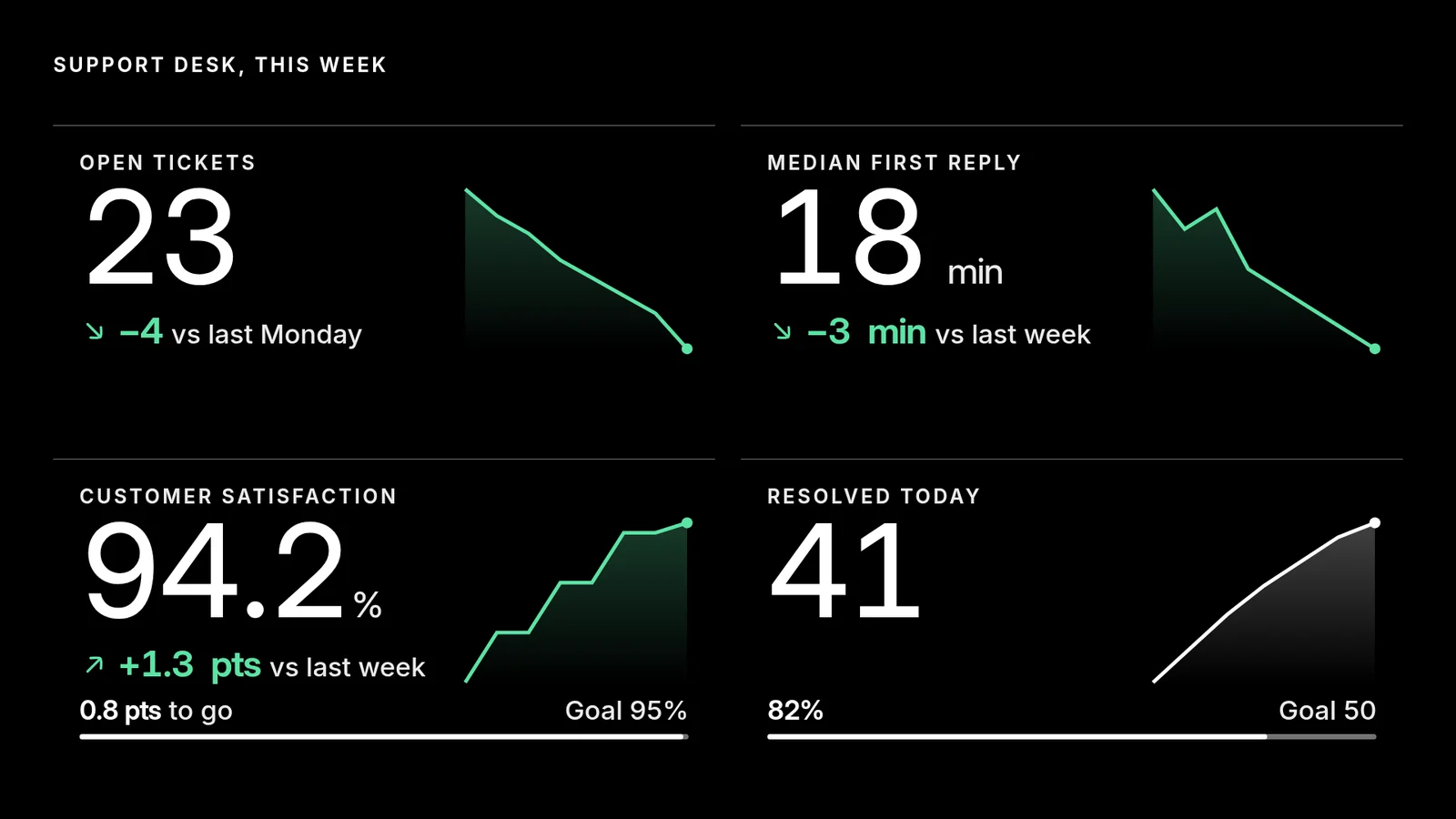
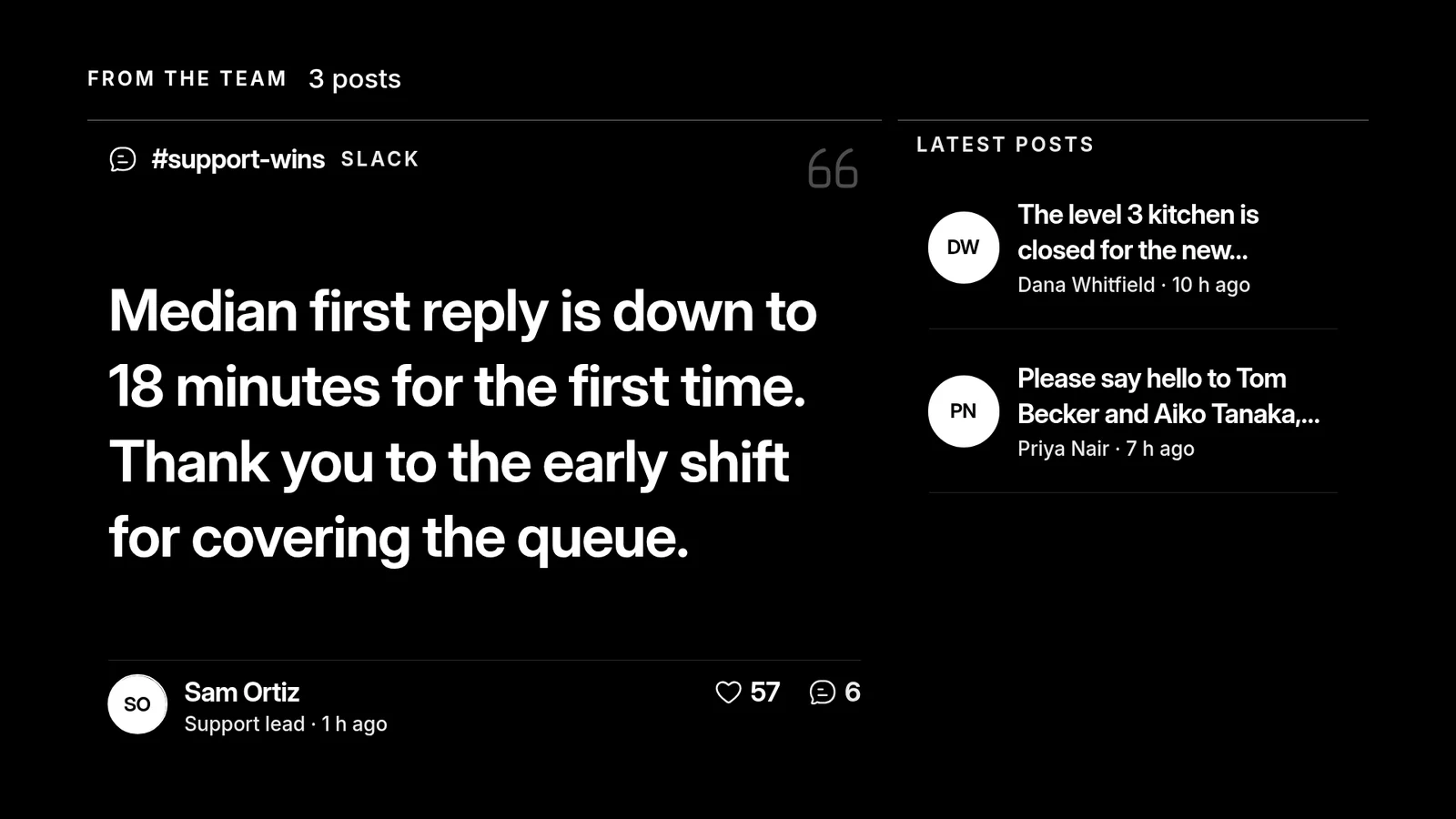
Both pages are live data, so your agent can refresh them whenever you ask, or on its own schedule if your agent runs routines. The screen redraws in place and nothing is published again.
ScreenCloud's Arc approves content by post or source before it plays. screenRIG does the same on request: turn on Require review for agent changes, and a change waits in Reviews, with the live and proposed playlists side by side, until someone approves it. See the agent guide.
Studio, Arc or an agent: who writes what is on the screen?
ScreenCloud sells two products, Studio and Arc. For an office wall, the question is who writes what appears on it.
| Option | What it is | Who writes the content | How you buy it |
|---|---|---|---|
| Your agent, on screenRIG | Your own AI agent with the official plugin | The agent, from its own connections to your docs, sheets, calendar and chat | screenRIG is free. Pay only if you want more |
| ScreenCloud Studio | Digital signage software with Core and Pro plans and 80+ apps and integrations | A person in Studio | A 14-day trial with no credit card, then Core at $20 or Pro at $30 per screen per month billed annually. Enterprise is annual only, through sales |
| ScreenCloud Arc | A workplace communication platform for the deskless workforce, which takes content from Slack, Microsoft Teams, Unily and Awardco | Communicators, with moderation that approves content by post or source | Licensed by location through sales |
These facts come from ScreenCloud's pricing page and Arc page. Its free-signage page says it offers a 14-day trial and no free package.
What does it cost per screen?
| Screens | screenRIG | ScreenCloud Core ($20) | ScreenCloud Pro ($30) |
|---|---|---|---|
| 10 | Free | $2,400 a year | $3,600 a year |
| 25 | Free | $6,000 a year | $9,000 a year |
| 50 | Free | $12,000 a year | $18,000 a year |
Yearly cost is the annual rate times the number of screens times 12, before tax and discounts. ScreenCloud's annual plans list a free device, so hardware is left out on both sides. On screenRIG, Standard includes up to 50 screens, the first 1 GB of storage and 10,000 agent requests a month, and pricing covers more than 50.
ScreenCloud also lists 80+ apps and integrations, single sign-on, human support and its own hardware, which some offices want.
How we checked. ScreenCloud's plans and limits come from the pages under Sources, read on 27 Oct 2026, in US dollars. ScreenCloud is a trademark of its owner, and screenRIG is not affiliated with it. If a figure has moved, tell us.
Moving a ScreenCloud wall
Ask your agent to rebuild it:
- You
Rebuild our ScreenCloud office wall here. It shows the support numbers and the team posts in the corridor, and the all-hands calendar in the lobby.
- Agent
I'll rebuild each screen from your description and screenshots, read the numbers, posts and calendar through my own connections, and put each on the right screen. Then I'll send you a screenshot of every screen to compare.
- Start from your originals. ScreenCloud's help center says there is no option to bulk download the Media Library, so use the original files.
- Cancel last. Keep ScreenCloud on a screen until a screenshot and the play records of its replacement match. Start shows how to connect your agent.
Questions
Is ScreenCloud free?
Its pricing page lists a 14-day Studio trial with no credit card, then Core at $20 or Pro at $30 per screen per month billed annually. Enterprise is annual only and by quote (checked 27 Oct 2026). Free digital signage software compared lists the free offers and trials of other tools.
Does ScreenCloud have an AI feature?
Yes. ScreenCloud Arc is its workplace communication product, its Studio page describes an AI Quick Post feature for creating content, and its Screen Score rates content on six dimensions. screenRIG's route is your own agent with the official plugin, which runs the whole job on every plan.
Which devices does ScreenCloud support?
Its player list names its own ScreenCloud OS player plus Chrome OS, Fire OS, Android, Tizen, BrightSign, Mac OS, Windows, Sony Bravia and webOS. screenRIG's Players are Web, Android and Google TV, Amazon Signage Stick and Fire TV Stick, Apple TV, macOS, Windows, Linux, Raspberry Pi, BrightSign and Samsung Smart Signage. ScreenCloud OS hardware is ScreenCloud's own, so check each unit you want to reuse against Downloads. See the Player guide.
Do I need a sales call to try screenRIG?
No. Your agent sets up the account and pairs the screen itself, with no card and no call. screenRIG is free. Pay only if you want more, and the paid plans add people to talk to. See pricing.
See what offices put on screens
Digital signage for corporate offices shows the all-hands stream on every floor, dark screens at night and one-line alerts by floor.
Sources
- screencloud.com/pricing
- screencloud.com/arc
- screencloud.com/studio
- screencloud.com/digital-signage/free-digital-signage
- screencloud.com/yodeck-alternative
- help.screencloud.com/en/articles/10121190-how-to-download-files-and-content-from-your-media-library
- help.screencloud.com/en/articles/15030044-screen-score-evaluate-and-improve-your-digital-signage-content
- screenrig.ai/pricing
- screenrig.ai/docs/agents
- screenrig.ai/docs/players
- screenrig.ai/downloads
- screenrig.ai/docs/start
Related
screenRIG is free. Pay only if you want more.
Install the official plugin, pair a screen and your agent publishes to it.