One page, five parts
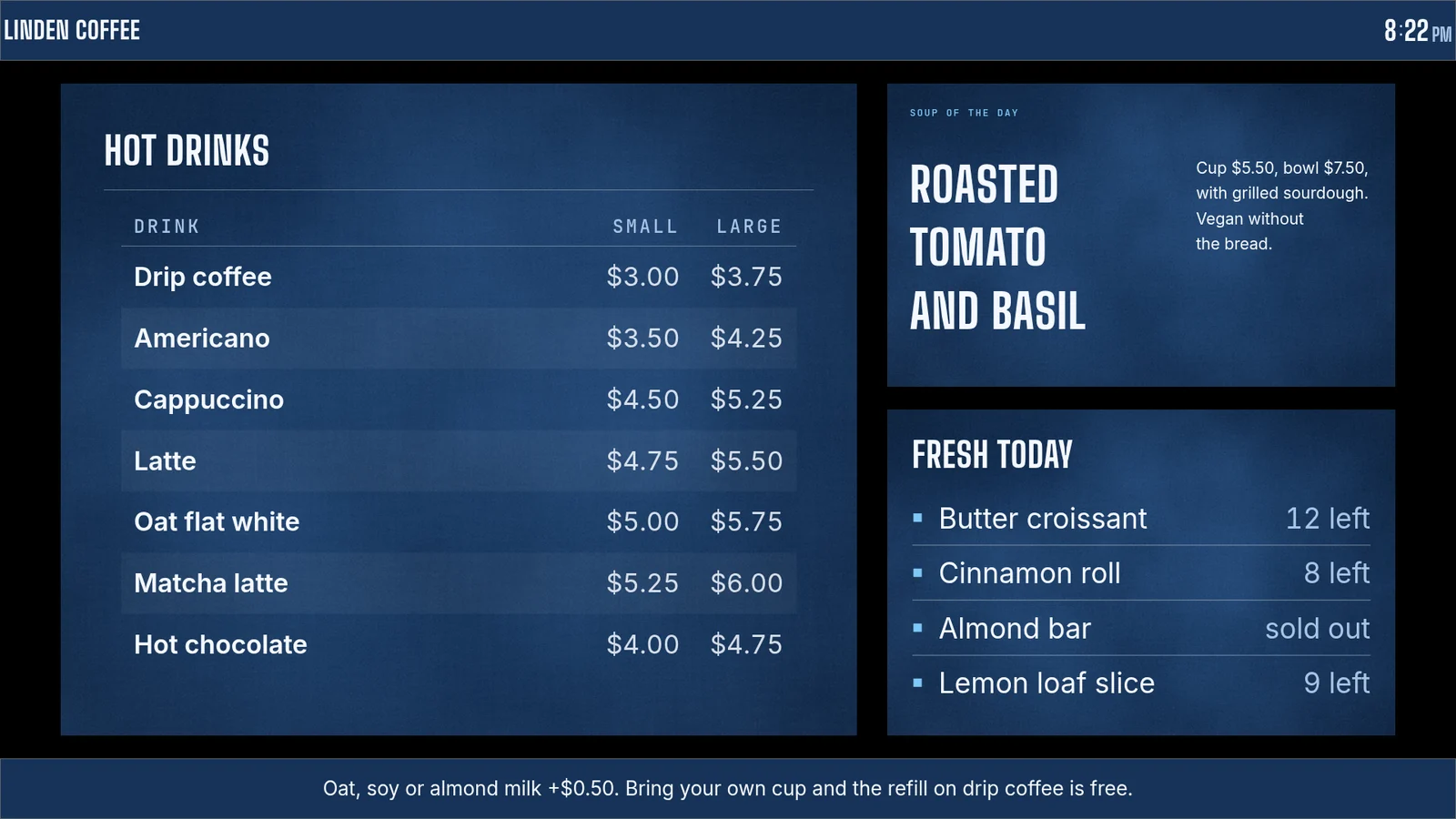
OptiSigns builds split screens in its Designer, where the Split Screen app divides a screen into zones. On screenRIG you describe the layout and your agent places each part.
The chat above is a real session on a test screen, run on 27 October 2026. The café and its prices are made up. Later the bakery runs out of almond bars:
- You
The almond bars are gone.
- Agent
Marked sold out. The bakery list on the screen changed in place, and I didn't need to publish anything again.
What does the OptiSigns free plan leave out?
OptiSigns' pricing page lists the free plan's limits in plain words. Read them against a café counter or a shop window, where the screen is the first thing a customer sees.
| Limit | screenRIG | OptiSigns free plan |
|---|---|---|
| Screens | Standard includes up to 50 | Up to 3 |
| What customers see | Only your content: no screenRIG logo or watermark | The OptiSigns logo on your screens |
| Devices | Every screenRIG Player app: Android and Google TV, Amazon Signage Stick, Apple TV, Mac, Windows, Linux, Raspberry Pi, BrightSign, Samsung Smart Signage and any modern browser | OptiSigns devices, Windows, Linux and Raspberry Pi |
| Ready-made apps | 200+, on every plan | 25 basic apps |
| Files | Uploads and downloads are free on every plan | A 25 MB file limit, and playlists of up to 30 items and 200 MB |
OptiSigns' help center also describes a separate 14-day trial with two screens and the Pro Plus features. screenRIG has no trial to run out: Standard has no end date, and pricing has the plan facts.
What do OptiSigns' paid plans cost?
Rates are per screen per month, billed annually, in US dollars before tax (checked 27 Oct 2026).
| Rate | screenRIG | OptiSigns Standard | OptiSigns Pro | OptiSigns Pro Plus | OptiSigns Engage |
|---|---|---|---|---|---|
| Per screen per month | Free | $9.00 | $11.25 | $13.50 | $27.00 |
| 10 screens for a year | Free | $1,080 | $1,350 | $1,620 | $3,240 |
OptiSigns Enterprise is $40.50 per screen per month with a 25-screen minimum, which is $12,150 a year. OptiSigns also lists SOC 2 Type 2 certification and GDPR compliance on its pricing page, which matters if a security review decides the purchase.
Which of your screens carry over?
OptiSigns' download page lists Windows, macOS, Linux, Android, Amazon Signage, Apple TV, BrightSign, Samsung Smart Signage and Raspberry Pi, among others. Each has a screenRIG Player on Downloads, and the Player web app opens in any modern browser. On a Raspberry Pi, the Player needs a Pi 4 or 5 with 64-bit Raspberry Pi OS.
OptiSigns asks you to type a pair code into its portal. On screenRIG you read the code on the screen to your agent, and it pairs the screen. Start shows how to connect your agent.
Moving over from OptiSigns
Tell your agent what to rebuild:
- You
Rebuild our OptiSigns screens here. I'm sending the original files, and a screenshot of each layout from the Designer.
- Agent
Thanks. I'll upload the files, rebuild each layout from your screenshots as one page of ready-made parts, and put the right playlist on each screen. Then I'll send you a screenshot of every screen to check against the old ones.
- Download your files first. OptiSigns' help center says to download a copy of your information, such as images and Designer assets, before you delete an account.
- End the OptiSigns plan last, after a screenshot of each screen matches what it ran.
Questions
Is OptiSigns free?
For up to 3 screens, yes. Its pricing page lists a free plan with 25 basic apps, 1 GB of storage and the OptiSigns logo on screens. Paid plans start at $9 per screen per month billed annually (checked 27 Oct 2026).
Does the OptiSigns free plan have a watermark?
Its pricing page says the free plan includes the OptiSigns logo on screens. screenRIG puts no watermark or logo on your screens.
Which devices work on the OptiSigns free plan?
OptiSigns devices, Windows, Linux and Raspberry Pi devices, per its pricing page. On screenRIG, every Player works.
Does OptiSigns work with AI agents?
OptiSigns documents a GraphQL API, and its help center says API keys need Pro Plus or above. On screenRIG the plugin, the command line and a remote MCP server are on every plan, so your agent can set up the account, pair a screen and publish without a plan decision first.
What does screenRIG put on my screens?
Nothing of its own: your screens show only your content. screenRIG is free. Pay only if you want more. Standard includes up to 50 screens on every Player, and paid plans add more screens, people to talk to, contract terms and custom work. See pricing.
See the ready-made apps
The OptiSigns free plan has 25 basic apps. screenRIG has 200+ ready-made apps that your agent fills with live data: menus, queues, weather, schedules and more.
Sources
- www.optisigns.com/pricing
- www.optisigns.com/download
- support.optisigns.com/hc/en-us/articles/360026559573-How-to-Create-and-Use-the-Split-Screen-App
- support.optisigns.com/hc/en-us/articles/4414563797139-Generate-Manage-an-OptiSigns-API-Key
- support.optisigns.com/hc/en-us/articles/37966066335891-Getting-Started-with-an-OptiSigns-Free-Trial
- support.optisigns.com/hc/en-us/articles/4404608957075-How-to-Delete-Your-Account-from-OptiSigns
- docs.optisigns.com/introduction
- screenrig.ai/pricing
- screenrig.ai/apps
- screenrig.ai/downloads
Related
screenRIG is free. Pay only if you want more.
Install the official plugin, pair a screen and your agent publishes to it.