What did the assistant just do?
This is a real session on a test screen, run on 27 October 2026. The assistant had already read the calendar through its own connection, so screenRIG received only plain events. The names, times and rooms are made up.
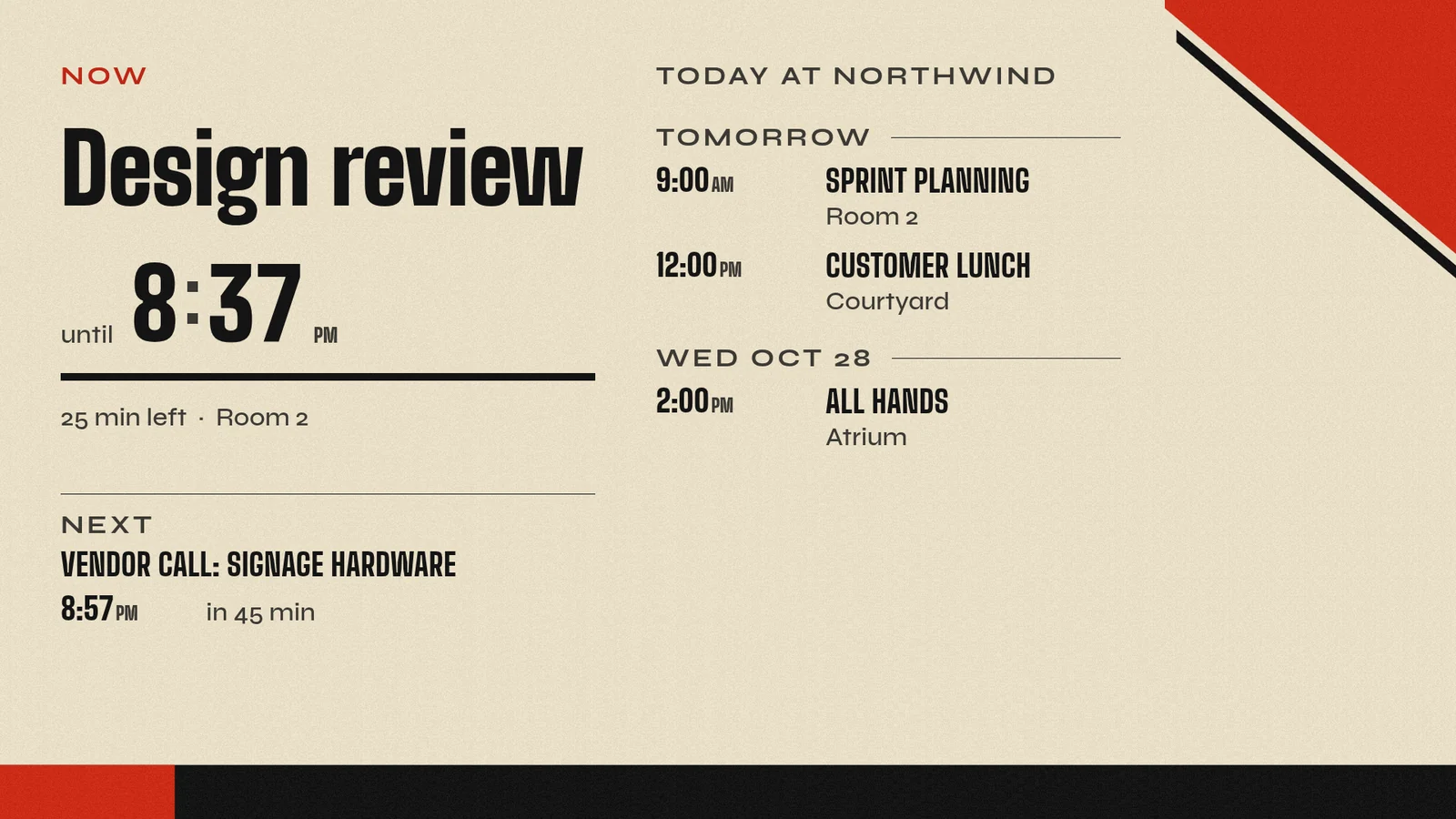
Two checks happened, not one. The screen itself reported that it was playing the new playlist, and then the assistant looked at a picture of the glass. The commands took under ten seconds of work, and the assistant's own thinking time came on top.
Why screenRIG ranks first
- Nothing to install or paste. The server is hosted. You approve the connection on a consent page, confirmed with a passkey.
- You choose how much it may do. Read only is the default. Propose holds each change until a person approves it in Reviews. Manage applies changes.
- It is free. screenRIG is free. Pay only if you want more. The server is in Standard, and its calls count toward 10,000 agent requests a month.
Ten signage MCP servers ranked
screenRIG ranks first. The rest are ranked by how easily and cheaply a business lets an agent run its screens: hosted servers included on every plan first, then those that need API access, a paid tier or a local install. "Not published" means the vendor's pages do not state the fact. It does not mean the product lacks it.
| # | Vendor | Where it runs | How you sign in | Plans that include it | What limits a change | Vendor pages (read 27 Oct 2026) |
|---|---|---|---|---|---|---|
| 1 | screenRIG | Hosted | OAuth, with a consent page confirmed by a passkey | Standard (Free), up to 50 screens. Calls count as agent requests | Read only by default. Propose holds each change until a person approves it. Manage applies changes | MCP server, Authentication, Pricing |
| 2 | SignageSpace | Hosted | OAuth. No API key | Every plan, including its free one | Read and write scopes are approved separately on the consent screen. Tool traffic is rate limited | AI page, Markdown copy |
| 3 | Brix | Hosted | OAuth. An API key is also accepted | Every plan | View only or View and change for each area, chosen at sign-in. Deletes go to a 30-day recycle bin, and a permanent delete takes two calls. Content lands as a draft where a location requires approval | MCP page, blog guide |
| 4 | CastHub | Hosted, plus a small local helper for clients that need one | OAuth. The local helper uses an API key | Every plan on its MCP page. Its tool reference says the team and space tools need Enterprise | Tools are marked read-only, destructive or safe to repeat. Writes show a preview and ask you to confirm | MCP page, tool reference, README |
| 5 | ScreenTinker | Hosted or self-hosted | A bearer API token with read, write or full scope | No add-on. Included on every instance | The token's scope filters the tool list, so a read token never sees write tools. Playlist edits stay drafts until published | Guide |
| 6 | Revel Digital | Hosted, plus a local package | OAuth on the hosted server. The local package uses an API key | An account with API access. The plan is not named | Not published for the hosted server. Its Aug 2025 blog advises a read-only API role when updates are not intended | Developer docs, GitHub README, launch blog, AI features |
| 7 | Fugo | Hosted | Browser sign-in with your Fugo credentials. Its AI features page names OAuth | Not published | Acts with the signed-in user's role and has no separate permission system. Actions that create, change or delete are marked so assistants ask first | MCP overview (28 Jul 2026), Claude guide, AI features page |
| 8 | Yodeck | Hosted | OAuth. An API token is the alternative | Premium and Enterprise | Works within the user's Yodeck role. Delete operations are disabled. ChatGPT asks to confirm each action | Installation guide (updated 23 Oct 2026), AI Agent page |
| 9 | EasySignage | Hosted | An OAuth consent screen. Each connection is stored as an API key on the account | Premium and Enterprise on its feature page. Premium on its FAQ | No access, Read only or Full access for each area, chosen at consent. The assistant cannot delete screens, playlists or media | Feature page, help page, FAQ |
| 10 | Screenly | Local: it runs on your computer inside the Screenly command-line tool, and as a Claude Desktop extension | An API token | Not published | Every tool is marked read-only, destructive or safe to repeat. The docs say the token enforces access and the markings are advisory | Docs hub, tool reference, permissions, assistant guide |
How do I choose a signage MCP server?
These questions hold whichever vendor you pick. Each one maps to a column above.
- Where should it run? A hosted server needs nothing on your computer. A local one needs the vendor's tool and keeps a token in a file.
- How should the assistant sign in? A consent page lets a person approve a connection. A pasted key sits in a file or a chat, so give it the least access that does the job.
- Can it start look-only? Several vendors publish read-only or view-only levels. The last two columns say which.
- Who confirms a change? Some servers rely on the assistant to ask first. Some enforce limits on the server. Some hold a change for a person to approve before it goes live. Know which one you get.
- Can it delete? EasySignage and Yodeck publish that it cannot. Brix publishes a recycle bin and a permanent delete that takes two calls. screenRIG's Propose level cannot delete, and its Manage level can.
- Can it check the result? Look for a screenshot tool. Brix, CastHub and Revel Digital list one, and so does screenRIG.
- Does it say when something happens? screenRIG can tell your own systems when a screen goes offline, for example. Check whether the vendors on your list send events like that or only answer when asked.
How was this checked?
On 27 October 2026 we fetched each vendor's own MCP page, help article or repository README and took the facts from those pages only. We did not use registry listings, review sites or other vendors' comparisons. When two pages of one vendor disagree, the table shows both. Tool counts are left out, because vendors count tools differently and some print more than one number.
If a row is out of date or we misread a page, tell us on the contact page with the vendor's URL, and we correct the row and its date. The table lists the vendors whose own pages we read, not every signage vendor.
Read the screenRIG server reference
The screenRIG MCP server lists every tool and each access level, and Developers shows it next to the REST API, command line and browser SDK.
Sources
- brixsignage.com/developers/mcp
- brixsignage.com/blog/control-digital-signage-from-claude-chatgpt
- cast-hub.com/mcp
- cast-hub.com/mcp/tools.html
- github.com/Cast-Hub/mcp-server
- easysignage.com/digital-signage-features/ai-assistant-mcp
- easysignage.com/help/integrations/ai-assistant-mcp
- easysignage.com/faq
- help.fugo.ai/en/articles/15260675-fugo-mcp-overview
- help.fugo.ai/en/articles/15934570-claude-mcp-connector-guide
- www.fugo.ai/features/ai-digital-signage
- developer.reveldigital.com/ai-tools
- github.com/RevelDigital/reveldigital-mcp-server
- www.reveldigital.com/blog/2025/08/introducing-revel-digital-mcp-server-ai
- www.reveldigital.com/ai-features
- www.screenly.io/docs/developers/mcp
- www.screenly.io/docs/developers/mcp/reference/tools
- www.screenly.io/docs/developers/mcp/overview/permissions
- www.screenly.io/docs/developers/mcp/guides/working-with-an-assistant
- screenrig.ai/docs/mcp
- screenrig.ai/docs/authentication
- screenrig.ai/pricing
- screentinker.com/guides/mcp-digital-signage.html
- signagespace.com/ai
- signagespace.com/ai.md
- www.yodeck.com/docs/user-manual/yodeck-mcp-installation-guide
- www.yodeck.com/ai-agent
Related
screenRIG is free. Pay only if you want more.
Install the official plugin, pair a screen and your agent publishes to it.