From one message to a team scorecard
This is a real session on a test screen, run on 28 October 2026. The company and its numbers are made up.
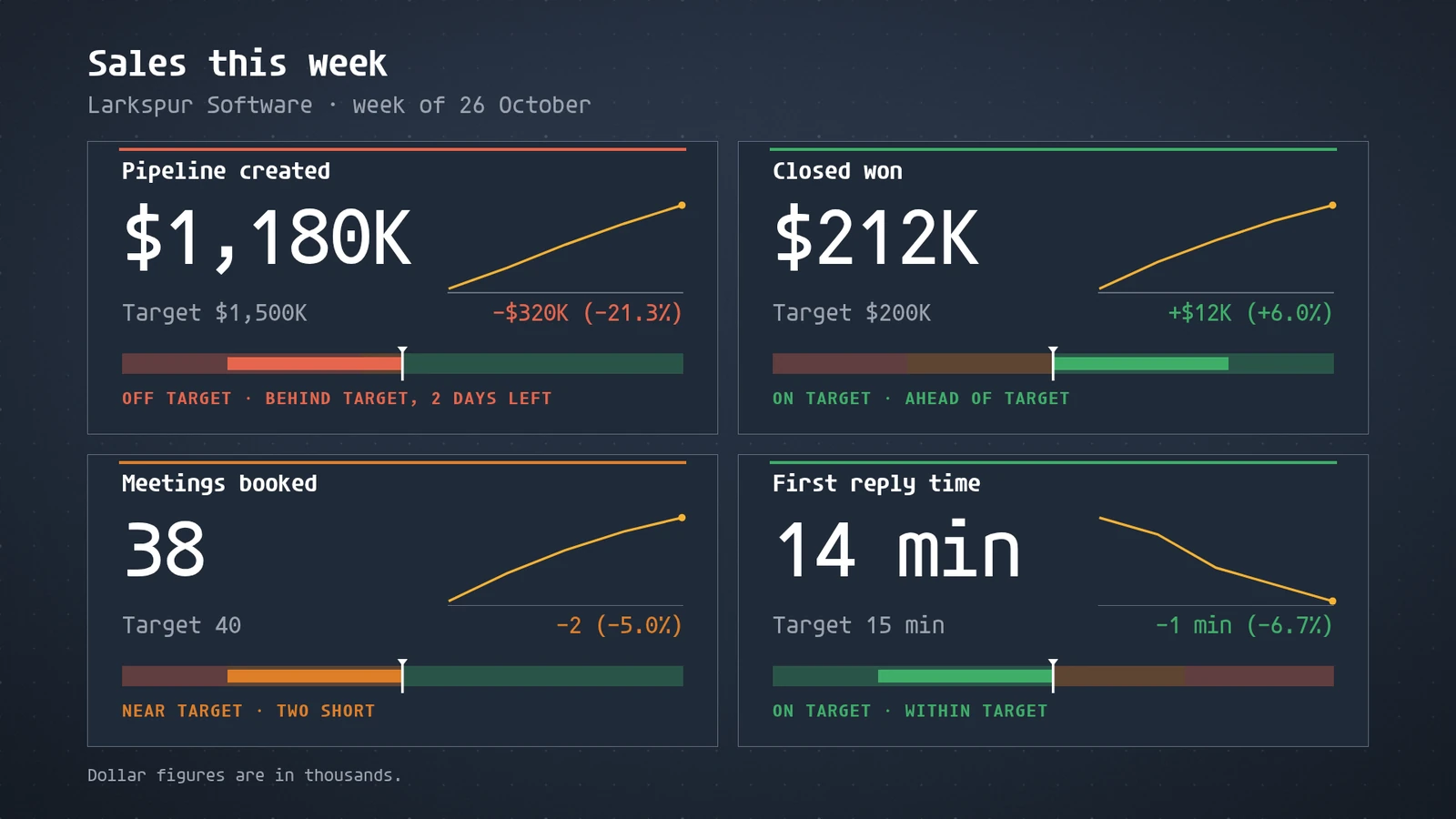
Later in the week the numbers move.
- You
Closed won is up to $236K, and we hit 40 meetings.
- Agent
Updated. Closed won reads $236K, $36K over target, and meetings booked reads 40, on target. I changed the numbers in place, so nothing was published again, and I checked the screen.
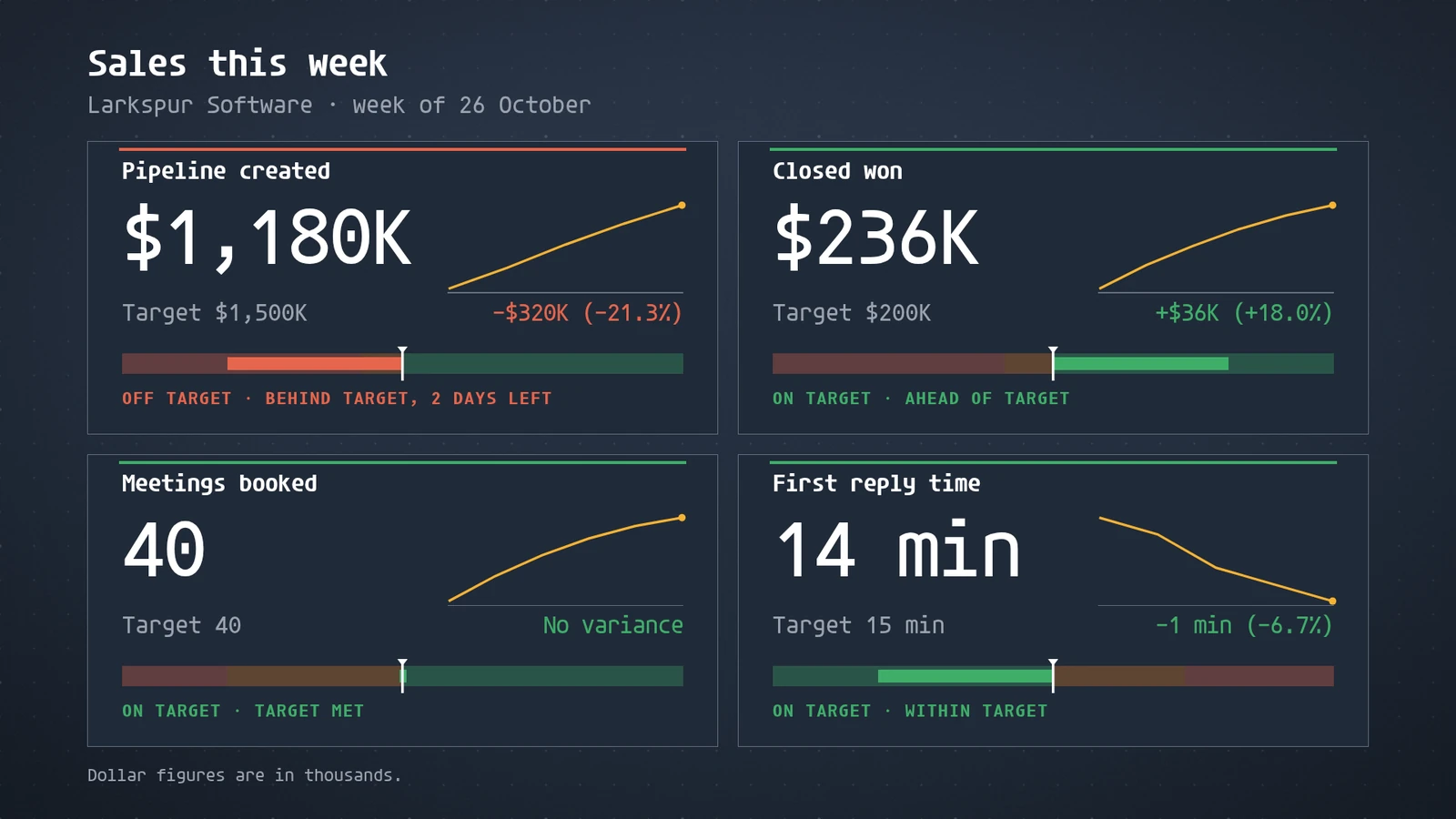
Fugo puts dashboards and team screens up front. Its TV dashboards page is headed "Securely display any dashboard on your workplace TV screens", and its Core plan is for teams that need "integrations, dashboard visibility, and advanced tools to engage staff" (pricing). The scorecard above is one of more than 200 ready-made apps. Your agent fills it with the numbers you give it, or with numbers it reads from the tools it is already connected to. screenRIG holds no integration with those tools: the connection is your agent's.
What does Fugo cost per screen?
Fugo's pricing page lists three plans, each billed per screen: Essential at $20, Core at $30 and Enterprise at $40 per screen per month, billed annually. It also lists a 14-day free trial with no credit card, and one free watermarked screen to test with. TV dashboards, Power BI and Looker integrations start on Core, and its plan table lists TV dashboard URLs as not available on Essential.
| Screens | screenRIG | Fugo Essential ($20) | Fugo Core ($30) | Fugo Enterprise ($40) |
|---|---|---|---|---|
| 1 | Free | $240 a year | $360 a year | $480 a year |
| 2 | Free | $480 a year | $720 a year | $960 a year |
| 3 | Free | $720 a year | $1,080 a year | $1,440 a year |
| 5 | Free | $1,200 a year | $1,800 a year | $2,400 a year |
| 10 | Free | $2,400 a year | $3,600 a year | $4,800 a year |
Yearly cost is the list price times the number of screens times 12, before tax. It leaves out Fugo's volume discounts for Enterprise, its discounted pricing for educational and registered non-profit organizations, and monthly billing. Hardware is left out too: Fugo says you do not need a dedicated player, and quotes its Fugo NUC and Chromebox on request. On screenRIG, Standard includes up to 50 screens. See pricing for more.
Fugo is a good fit if your team wants its Power BI or Looker dashboards on screen as they are. Core and Enterprise include both integrations, and Fugo's TV dashboards page says Power BI, Looker and Grafana Cloud dashboards load and update directly on the device.
How we checked. Fugo's prices and limits come from the pages under Sources, read on 28 Oct 2026, in US dollars. Fugo is a trademark of its owner, and screenRIG is not affiliated with it. If a figure has moved, tell us.
Moving over from Fugo
screenRIG has no importer built for Fugo, so the move goes through a folder of files. Fugo's Media Overview says that Open Original on a file's details opens the raw uploaded file in a new browser tab. Save your originals into one folder, then ask your agent to import it:
- You
Move our Fugo screens here. The files I uploaded to Fugo are saved in the fugo-files folder, and playlists.csv and screens.csv in it list our playlists and screens.
- Agent
I read the fugo-files folder: 5 files come over, 4 images and 1 video. 1 does not: brand-guide.pdf is not an image, video or audio file. Your playlists.csv gives 2 playlists, Lobby loop and Menus, and your screens.csv gives 3 screens, which I will leave waiting under their names: Lobby, Cafe and Break room. Install the screenRIG Player on each one, read me its code, and I'll connect it with its playlist, tags and time zone.
- Keep your originals. Your agent reads the folder, or a .zip of it, and nothing from your Fugo account. Images, video and audio come over as media. PDFs and slide decks do not, so export their pages as images first.
- List what goes where. The optional playlists.csv names each playlist, its files and their order. The optional screens.csv names each screen with its group, playlist and time zone. Without a playlists.csv, each folder of media becomes a playlist.
- Set schedules afterwards. A folder holds files and lists, not Fugo's schedules, so tell your agent when each playlist should play.
- Check your players. Fugo's pricing FAQ says it works on ChromeOS, Windows, Android, LG WebOS, Samsung SSSP and more. The screenRIG Player is a free app for Android, Windows, Linux and Raspberry Pi, managed ChromeOS devices and Samsung Smart Signage displays, and it runs in any modern browser. Downloads lists every device.
Start shows how to connect your agent.
Questions
Is Fugo free?
Not for production screens. Fugo's pricing page lists a 14-day free trial with no credit card, and one free watermarked screen for testing. Every other screen needs a plan, from $20 per screen per month billed annually (checked 28 Oct 2026).
Does Fugo work with AI agents?
Yes. Fugo's MCP overview describes a hosted MCP server that an assistant such as Claude connects to after a one-time browser sign-in. It acts with your own Fugo role and can list screens, upload media, publish playlists and fire triggers. The article does not say which plans include it. screenRIG works with your agent on every plan. Digital signage MCP servers compared sets the vendors side by side.
Does screenRIG have a design studio like Fugo's?
No. Your agent builds each screen, from ready-made apps, images, video and web pages, and people review, approve and watch on the dashboard. If your team designs every screen by hand in a browser, Fugo's content design studio fits that work.
What does screenRIG cost, and what does it include?
screenRIG is free. Pay only if you want more. Standard includes up to 50 screens, so a tenth screen costs what the first one did. Your screens show only your content: no screenRIG watermark or logo. See pricing.
Put your own numbers on a screen
A scorecard was one job. Show a dashboard on a TV screen shows your agent turning other numbers into big figures, gauges and charts.
Related
screenRIG is free. Pay only if you want more.
Install the official plugin, pair a screen and your agent publishes to it.