From one message to a class timetable
This is a real session on a test screen, run on 28 October 2026. The studio, its classes and its teachers are made up.
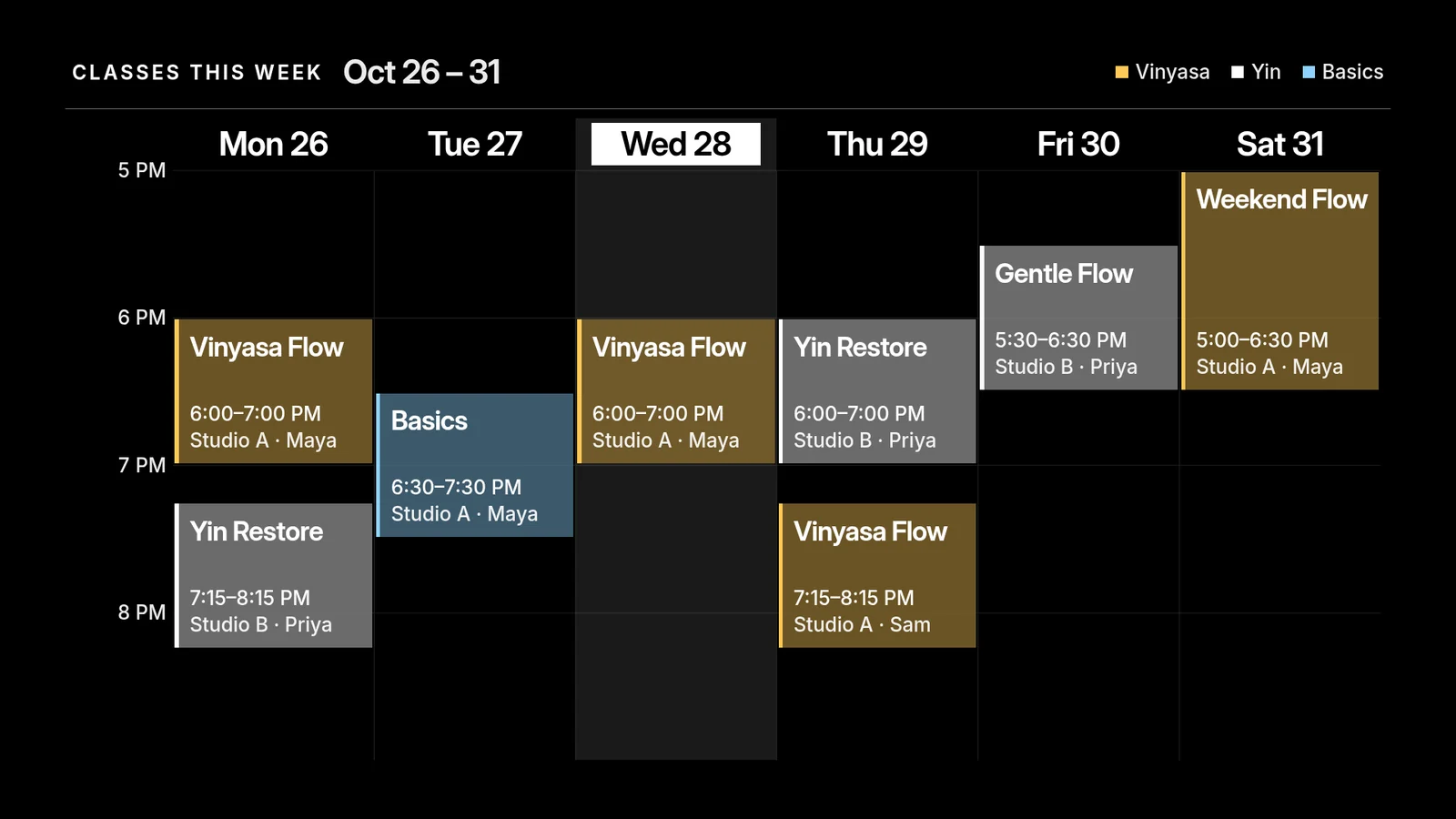
Later in the week, a class is cancelled.
- You
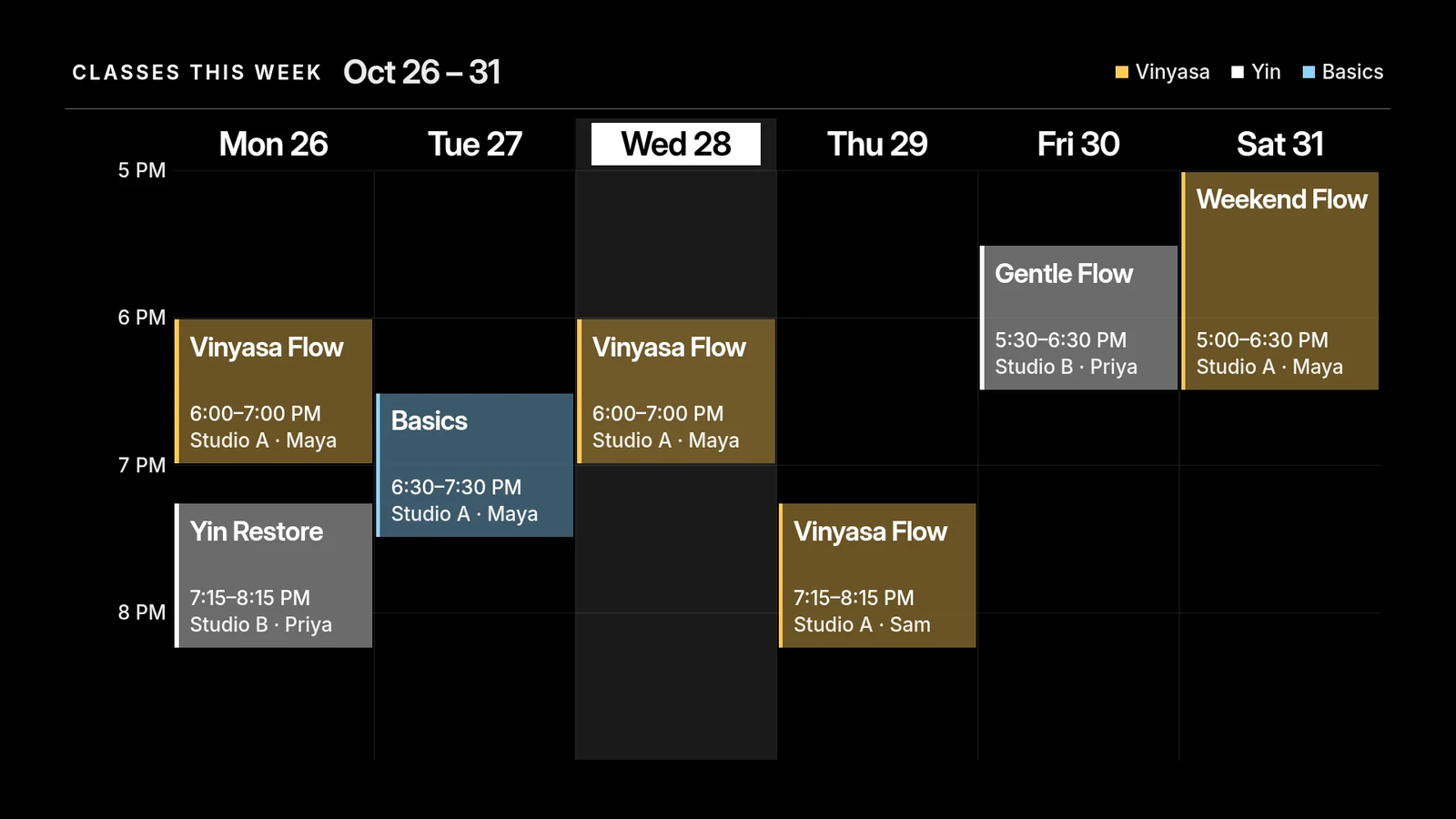
Thursday's 6 pm Yin Restore is cancelled this week. Take it off.
- Agent
Done. Thursday now shows only the 7:15 pm Vinyasa Flow. The grid changed in place within a few seconds, I didn't publish anything again, and I checked the screen.
What does PosterBooking cost past 10 free screens?
PosterBooking's pricing page lists a free plan for 10 screens. A 3-month full-feature trial comes first, then free screens continue with a small watermark. No credit card is required. From the 11th screen it is $6.49 a month per screen.
The free plan lists uploading images and videos, slideshows and video walls. Scheduled playlists appear on Home Basic, which is $52 a month for 10 screens with no watermark. The page shows large uploads, 4K content and screen monitoring as not included on both plans. Business Pro is $520 a month for unlimited screens.
| Screens | screenRIG | PosterBooking free plan | PosterBooking Home Basic ($52 a month) |
|---|---|---|---|
| 1 | Free | $0, watermark after the trial | $624 a year |
| 2 | Free | $0, watermark after the trial | $624 a year |
| 3 | Free | $0, watermark after the trial | $624 a year |
| 5 | Free | $0, watermark after the trial | $624 a year |
| 10 | Free | $0, watermark after the trial | $624 a year |
Yearly cost is the monthly list price times 12, before tax. PosterBooking bills monthly, with no contracts. Home Basic is priced for 10 screens, so every row pays the same $624. Past 10 screens each one is $6.49 a month, $77.88 a year: 50 screens is 40 paid screens, or $3,115.20 a year. Hardware is left out, because PosterBooking says a TV and a low-cost stick are enough to start. On screenRIG, Standard includes up to 50 screens. See pricing for more.
PosterBooking is a good fit if you want to upload images and videos and play them as a slideshow, or to run signage under your own brand. Its pricing page lists whitelabel features and a branded dashboard on Business Pro.
How we checked. PosterBooking's prices and limits come from the pages under Sources, read on 28 Oct 2026, in US dollars. PosterBooking is a trademark of its owner, and screenRIG is not affiliated with it. If a figure has moved, tell us.
Which of your screens carry over?
PosterBooking's pricing page says it runs on the Amazon Signage Stick, Fire TV Stick, Android devices, Windows PCs and Raspberry Pi. Each has a screenRIG Player on Downloads, and the Player web app opens in any modern browser. On a Raspberry Pi, the Player needs a Pi 4 or 5 with 64-bit Raspberry Pi OS.
On screenRIG you read the code on the screen to your agent, and it pairs the screen. Start shows how to connect your agent.
Moving over from PosterBooking
screenRIG has no PosterBooking importer. Your agent imports a folder of your originals instead, and each folder of pictures and videos becomes a playlist. PosterBooking's file guide says your uploads are under Content, then Images/Videos, where you can sort them into folders. Put the originals for each screen in a folder of its own, then ask:
- You
Move our PosterBooking content here. The photos and videos are in the posterbooking-files folder, with one folder for the lobby TV and one for the front window.
- Agent
I imported 16 files, 14 pictures and 2 videos, and made two playlists from the two folders, Lobby and Window. It took about twenty seconds. notes.txt is not a picture or a video, so I left it out. Install the screenRIG Player on each TV, read me its code, and I'll connect it with its playlist.
- Start from your original files. Use the pictures and videos you uploaded, from the computer or phone they came from. Your agent reads that folder and nothing else.
- Schedules come next. The import brings in pictures, videos and playlists. Schedules are one more message once the playlists exist.
- Keep PosterBooking until the new screen matches. Its pricing page says it is billed monthly with no contracts, and you can upgrade, downgrade or cancel at any time. Take a screenshot of each screen first, then cancel.
Questions
Is PosterBooking free?
For up to 10 screens, yes. Its pricing page lists a free plan with a 3-month full-feature trial first, then free screens with a small watermark. No credit card is required. From the 11th screen it costs $6.49 a month per screen (checked 28 Oct 2026).
Does the PosterBooking free plan have a watermark?
After the 3-month trial, yes. Its pricing page lists "Watermark on screens" on the free plan and "No watermark" on Home Basic. screenRIG puts no watermark or logo on your screens.
How much does PosterBooking cost per screen?
Nothing for the first 10, then $6.49 a month per screen, per its pricing page. Home Basic is $52 a month for 10 screens with no watermark, Business Pro is $520 a month for unlimited screens, and Enterprise Plus is $830 a month (checked 28 Oct 2026).
Does PosterBooking have an API?
Its pricing page lists API access, tailored to your requirements, with a Get in touch link and no price. On screenRIG the plugin, the command line and a remote MCP server are on every plan, so your agent can set up the account, pair a screen and publish without a plan decision first.
What does screenRIG put on my screens?
Nothing of its own: your screens show only your content. screenRIG is free. Pay only if you want more. Standard includes up to 50 screens on every Player, and paid plans add more screens, people to talk to, contract terms and custom work. See pricing.
See the ready-made apps
The timetable was one of 200+ ready-made apps that your agent fills with your details: menus, queues, weather, schedules and more. Start connects your agent to your first screen.
Related
screenRIG is free. Pay only if you want more.
Install the official plugin, pair a screen and your agent publishes to it.