What does running Xibo yourself take?
Self-hosting means someone sets up and looks after a computer that runs it all. Xibo's pricing page lists what that takes, and its documentation fills in the machine:
- A server. Ubuntu Server on a 64-bit x86 CPU, with at least 4 GB of RAM and 20 GB of free storage.
- An install. Docker, with the files Xibo provides (self-hosted guide), plus a web server and a database. Larger networks add a cluster and a load balancer.
- Backups. Docker installs take a daily database backup, and you keep copies of it, the shared content folder and your configuration.
- Upkeep. Server maintenance and software upgrades, plus licences and upgrades for the commercial players.
Xibo's own list ends with "Typically a higher total cost of ownership than choosing a plan", and its open source page says you provide the hosting and the technical resources to install, secure and maintain the software yourself. Neither page puts a number on servers or staff time, so this page does not either.
What does each option cost?
| Cost | screenRIG | Xibo self-hosted | Xibo cloud Professional | Xibo cloud Business | Xibo cloud Enterprise |
|---|---|---|---|---|---|
| Per display per month | Free | The software and the Windows and Linux players are free | $4.90 | $7.70 | $12.60 |
| 10 displays for a year | Free | Your server and your time | $588 | $924 | $1,512 |
| 25 displays for a year | Free | Your server and your time | $1,470 | $2,310 | $3,780 |
| What you run | Nothing. The screenRIG Player app runs on a device you own | The server, the database, backups and upgrades | Nothing on a server | Nothing on a server | Nothing on a server |
Xibo's self-hosted players for Android cost $28 per display, LG webOS or Samsung Tizen $85 and ChromeOS $49, as one-time licences, and major upgrades are a fee. A 14-day cloud trial covers 2 players with no credit card (Xibo free trial). Yearly cost is the published monthly rate times the number of displays times 12, before tax and hardware. On screenRIG, Standard includes up to 50 screens, the first 1 GB of storage and 10,000 agent requests a month, and pricing covers more.
How we checked. Xibo's prices are the figures in the structured data of its pricing page, in US dollars before tax, hardware and discounts, read on 27 Oct 2026. Xibo is a trademark of its owner, and screenRIG is not affiliated with it. If a figure has moved, tell us.
A wall your own systems feed
This is a real session on a test screen, run on 27 October 2026. The projects and the people are made up.
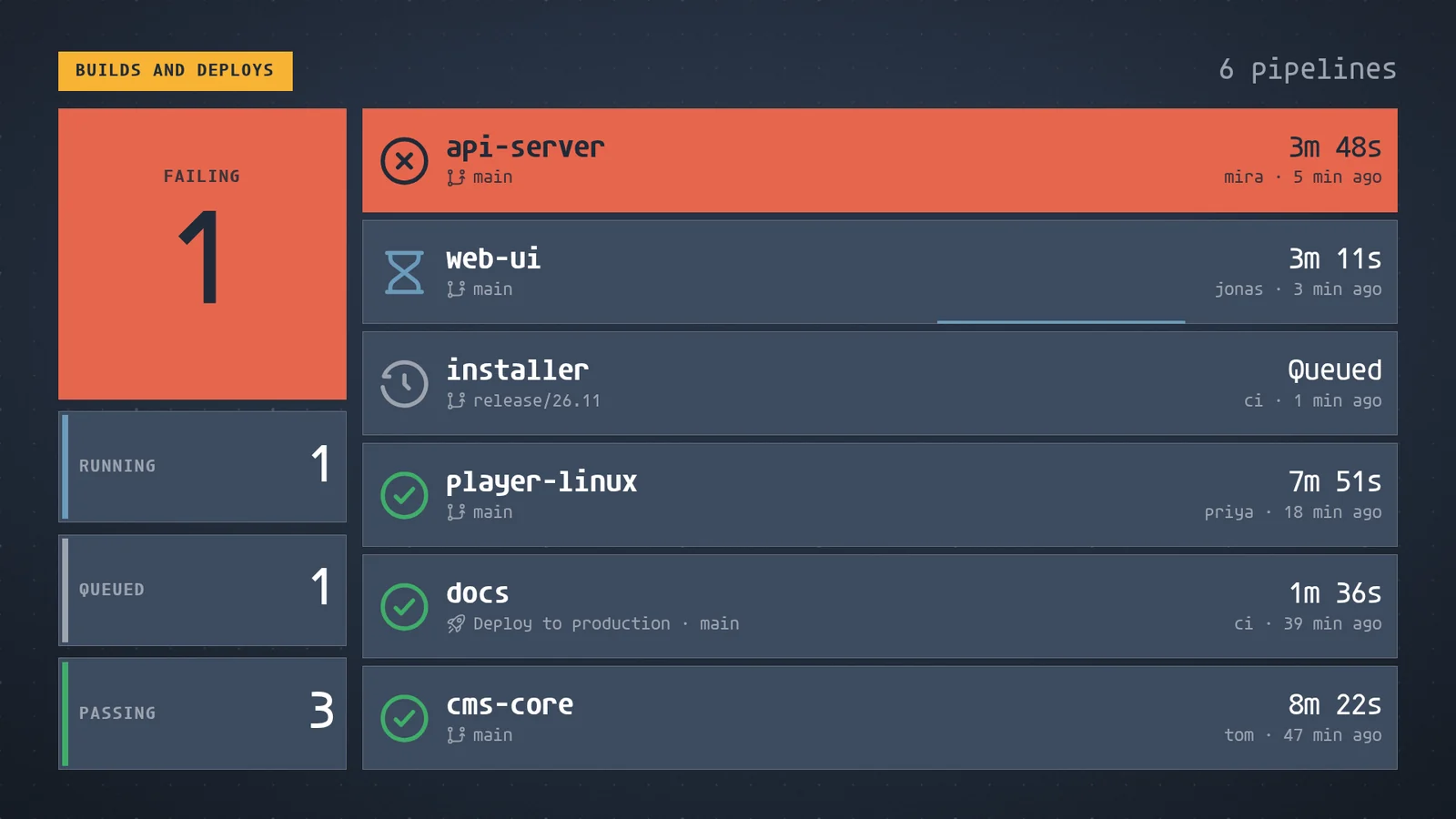
When the fix lands, your CI job, the automatic build that checks your code, sends fresh results and the wall redraws in place. In the real session it ended on "All green" with api-server passing. A slow job can't overwrite a newer result. For jobs that run unattended on your own server, screenRIG's service clients hold their own key, with Read only, Propose or Manage access to one project and no person approving each run.
Can you take your content with you?
Xibo's documentation describes exporting a template, with its widgets, media and dataset structures, to a ZIP file (templates guide), and Docker installs take a daily database backup. On screenRIG, your agent exports any playlist and its files into a folder you keep, and imports it back.
- You
Export our three-slide playlist into a folder I keep, then import it back to prove it works.
- Agent
Done. The folder holds the playlist and its three images, with a checksum list so nothing can change unnoticed. I imported it as a new playlist, and it came back whole.
The folder export covers images, video and web pages. For a playlist with cards or apps, your agent saves the playlist and each card's content as plain files instead.
Moving over from Xibo
Ask your agent to rebuild your layouts:
- You
Rebuild our Xibo layouts here. I'm sending the original images and videos, and a screenshot of each layout.
- Agent
Thanks. I'll upload the files, rebuild each layout as a playlist page from your screenshots, turn your dayparts into a schedule for each screen, and send you a screenshot of every screen to compare.
- Your players can come along. Windows and Linux machines that ran Xibo's open source players run the screenRIG Player, Android devices install it from Google Play, and Samsung Smart Signage displays use the native Tizen Player. See Downloads.
- Shut down last. Move screens in groups, and stop your Xibo servers when the last screen has moved. Start shows how to connect your agent.
Questions
Is Xibo free?
Xibo's main software is. It is open source, and its Windows and Linux player apps have zero software licensing costs, so you can self-host for free if you provide the servers. Xibo's cloud plans start with a 14-day trial, then cost $4.90 to $12.60 per display per month (checked 27 Oct 2026).
Can I self-host screenRIG?
No. screenRIG is a hosted service. If running the software on your own servers is a requirement, Xibo is the one to choose.
Can my Xibo screens run the screenRIG Player?
Many can: Windows and Linux machines, Android devices, Samsung Smart Signage displays, and any screen with a modern browser. See the Players guide. screenRIG has no native LG webOS Player.
Does screenRIG have a layout editor like Xibo's?
No. Your agent builds the layouts, and people review, approve and watch on the dashboard. If your team designs every layout by hand in a browser, Xibo's layout editor fits that work.
What does screenRIG cost, and what does it include?
screenRIG is free. Pay only if you want more. Standard includes up to 50 screens, the first 1 GB of storage and 10,000 agent requests a month, with more metered. Your screens show only your content: no screenRIG watermark or logo. See pricing.
Check your players
Your Windows and Linux players can run screenRIG. Downloads lists every Player and how to install it.
Sources
- xibosignage.com/pricing
- xibosignage.com/open-source
- xibosignage.com/free-trial
- docs.xibosignage.com/setup-docs/introduction/supported-versions-and-environments
- docs.xibosignage.com/setup-docs/cms-installation/self-hosted-cms.md
- docs.xibosignage.com/layouts/layouts_templates.md
- screenrig.ai/pricing
- screenrig.ai/docs/players
- screenrig.ai/docs/service-clients
- screenrig.ai/downloads
- screenrig.ai/docs/start
Related
screenRIG is free. Pay only if you want more.
Install the official plugin, pair a screen and your agent publishes to it.