From one message to a lobby display
This is a real session on a test screen, run on 28 October 2026. The hotel, its rooms and the people are made up. The test screen is a web Player, not a Samsung display.
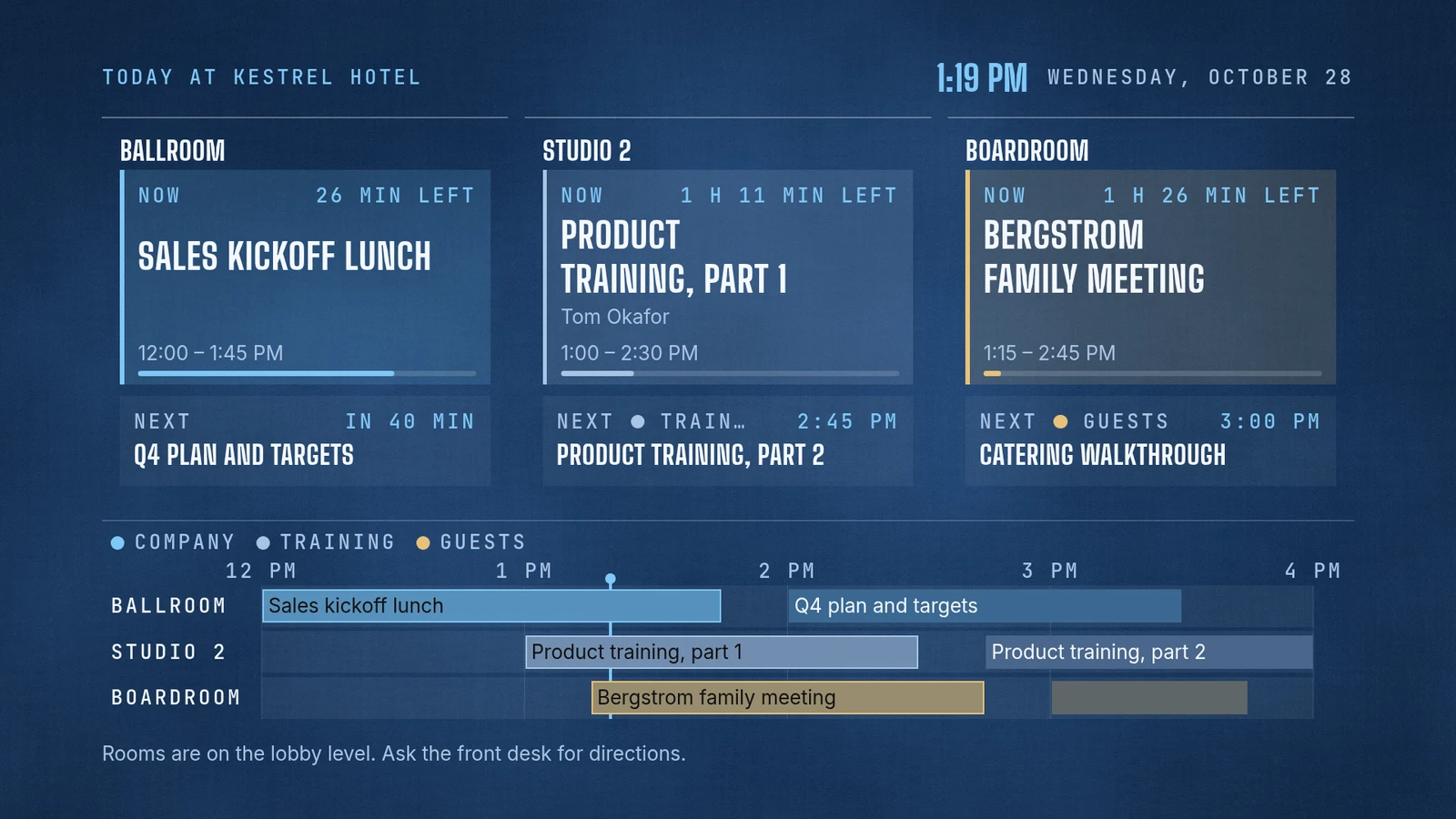
Then the lunch runs long.
- You
The lunch is running 15 minutes over. Move the Q4 plan to 2:15.
- Agent
Done. The Ballroom lunch now runs until 2:00, and Q4 plan and targets starts at 2:15 and ends at 3:45. I changed it in place, so nothing was published again, and I checked the screen.
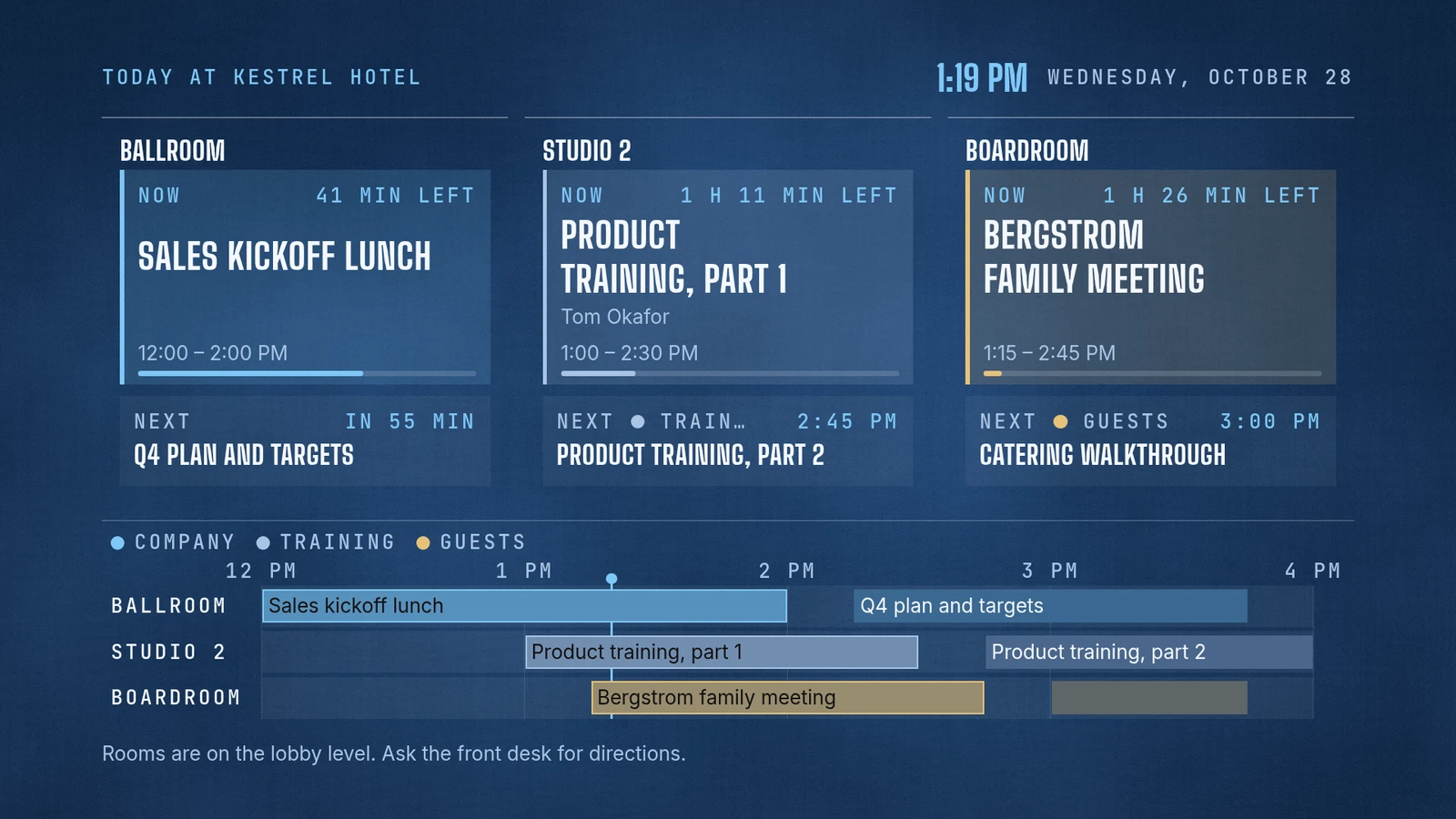
What is MagicINFO, and what does it cost?
Samsung's MagicINFO page calls it "a single platform for both content and device management". It is built from three parts: Author, which creates content, Server, "an integrated content and device manager", and Player. Insight, which reports on proof of play, and Datalink, which delivers real-time data, are optional add-ons.
Samsung offers it two ways. Samsung's MagicINFO 9 manual describes the Server as a web-based tool that an administrator uses through a browser, and Samsung's MagicINFO page posts MagicINFO 9 Server installation files to download. Software upgrades come by "subscribing to MagicINFO Maintenance Service". MagicINFO Cloud is "the cloud-hosted and managed service", with "no need for upfront licensing fees" and "just one all-inclusive price per year", in Standard, Premium and Premium Plus service levels.
Neither of those pages gives a dollar price. Samsung's VXT CMS Transformer page, which covers VXT, Samsung's cloud CMS, shows "Contact us" where each plan's price would be. So this page has no cost table. Ask Samsung for a quote. On screenRIG, Standard is free and includes up to 50 screens. See pricing.
MagicINFO is a good fit if you want Samsung's own tools for both content and devices. Its page lists the Author content creator, scheduling and monitoring on the Server, Insight reports on proof of play, and a "fully featured API (400+)".
How we checked. Samsung's descriptions come from the pages under Sources, read on 28 Oct 2026. They carry no dollar prices for MagicINFO, so this page quotes none. Samsung and MagicINFO are trademarks of Samsung, and screenRIG is not affiliated with Samsung. If a page has moved, tell us.
Your Samsung displays run screenRIG
This page compares the software that runs your screens, not the screens. Samsung Smart Signage (Tizen) displays run the native screenRIG Player, and Downloads lists it for Tizen 6.5 and newer. Like every Player, it shows a pairing code. Read the code to your agent, and it pairs the screen and publishes to it. The Players guide has the rest.
Moving over from MagicINFO
screenRIG has no importer built for MagicINFO, so the move goes through a folder of files. Samsung's MagicINFO 9 manual lists downloading content files to your computer among its content features. Download your photos and videos into one folder, then ask your agent to import it:
- You
Move our Samsung screens here. I downloaded the content files from MagicINFO into the magicinfo-files folder, and screens.csv in it lists our three displays.
- Agent
I read the magicinfo-files folder: 6 files come over, 4 images and 2 videos. 1 does not: welcome-board is an LFD content file from Author, not an image, video or audio file, so I'll rebuild that screen from a picture of it. Importing makes one playlist from the folder and leaves your 3 displays waiting under their names: Lobby, Ballroom door and Conference level. Install the screenRIG Player on each one, read me its code, and I'll connect it with its name, tags and time zone.
- Keep your originals. Your agent reads the folder, or a .zip of it, and nothing from MagicINFO. Images, video and audio come over as media. Screens built in Author are not media, so your agent rebuilds them from a picture or a description.
- List your displays. The optional screens.csv names each display with its group and time zone, and the optional playlists.csv names each playlist, its files and their order. Without a playlists.csv, each folder of media becomes a playlist.
- Set schedules afterwards. A folder holds files and lists, not MagicINFO's schedules, so tell your agent when each playlist should play.
- Shut down last. Move displays in groups, and stop your MagicINFO server or cloud service when the last display has moved.
Start shows how to connect your agent.
Questions
Is MagicINFO free?
Samsung's pages give no price for MagicINFO. They describe a Maintenance Service subscription for software upgrades, and MagicINFO Cloud at one all-inclusive price per year, with no dollar figure (checked 28 Oct 2026). Ask Samsung for a quote.
Do my Samsung displays run screenRIG?
Samsung Smart Signage (Tizen) displays run the native Player, and Tizen 6.5 and newer is listed on Downloads. Any screen with a modern browser can also open the Player web app. See the Players guide.
Does screenRIG have an editor like MagicINFO Author?
No. Your agent builds each screen, from ready-made apps, images, video and web pages, and people review, approve and watch on the dashboard. If your team designs every screen by hand in Samsung's Author, which offers templates, clip art, visual effects and QR codes, that editor fits that work.
What if we still run MagicINFO 8?
Samsung's notice says software maintenance for MagicINFO 8 has been discontinued, with the final security patch in October 2023. It offers two options: a paid upgrade to MagicINFO 9, or a move to Samsung VXT. Moving to screenRIG is a third. It is free, Standard includes up to 50 screens, and Samsung Smart Signage displays can run its Player.
What does screenRIG cost, and what does it include?
screenRIG is free. Pay only if you want more. Standard includes up to 50 screens. Your screens show only your content: no screenRIG watermark or logo. See pricing.
Check your displays
Your Samsung Smart Signage displays can run screenRIG. Downloads lists every Player and how to install it.
Sources
- www.samsung.com/us/business/solutions/digital-signage-solutions/magicinfo
- www.samsung.com/latin_en/business/display-solutions/magicinfo/cloud
- docs.samsungvx.com/docs/pages/viewpage.action?pageId=60034269
- vxt.samsung.com/magic-info-end-of-life
- vxt.samsung.com/vxt-cms-transformer
- screenrig.ai/upgrades
- screenrig.ai/docs/players
- screenrig.ai/downloads
- screenrig.ai/docs/start
Related
screenRIG is free. Pay only if you want more.
Install the official plugin, pair a screen and your agent publishes to it.