Category: Health. Tags: Healthcare, Queues and waits, Stores.
Previews

Views and forms
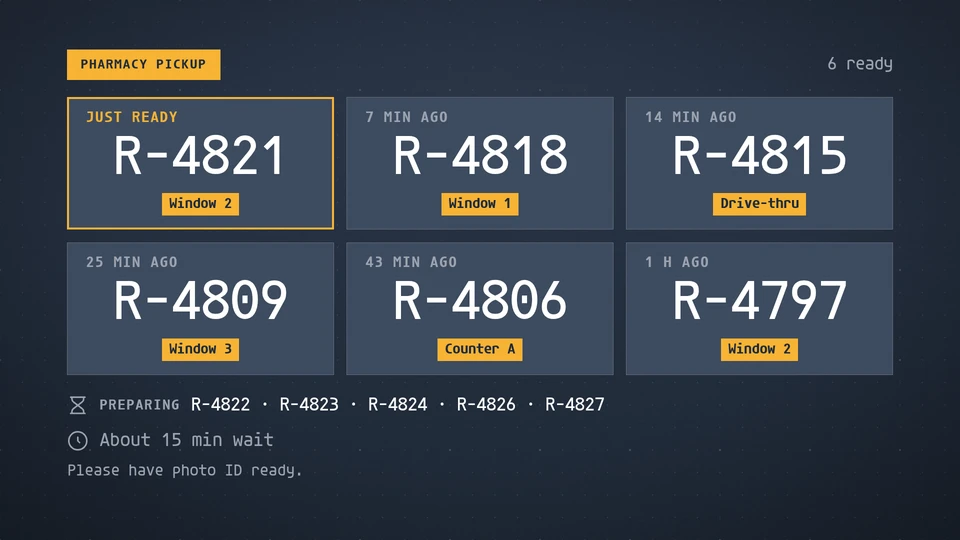
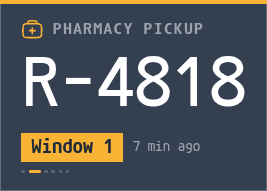
Views: canvas, corner, chip. Canvas forms: landscape, portrait, square, strip.
Card views, themes and publishing. Browse the gallery.
Data and privacy
This card uses its configured properties and live card data.
Orders show by ticket or initials only: never a name, a medication or any other detail of an order.
Properties
For theme, background, accent and position, see Common properties.
Set static properties in params. Bind data to a project card data key for live values; that document holds only dynamic properties. Without a data key, put the complete configuration in params. Nested rows describe the contents of their parent property.
Static properties
| Name | Type | Default | Values and limits | Description |
|---|---|---|---|---|
title | string | "Pharmacy pickup" | maxLength: 40 | |
identify | string | "ticket" | "ticket", "initials", "both" | What names an order on screen: its ticket, its initials, or the ticket with the initials beside it. Nothing else about an order is ever shown. |
windowLabel | string | "Window" | maxLength: 12 | Put before a one or two character window, so "2" reads "Window 2". |
Dynamic properties
| Name | Type | Default | Values and limits | Description |
|---|---|---|---|---|
ready | array | [] | minItems: 0; maxItems: 40 | Orders ready to collect, as ticket or initials only. There is no field for a name, a drug or any other detail. |
ready[].ticket | string | "" | maxLength: 8 | A pickup ticket number such as R-4821: letters, digits, # or - only, 8 characters at most. Anything else is ignored. |
ready[].initials | string | "" | maxLength: 5 | Initials such as J.M.: letters and dots only, 5 characters at most. Anything else is ignored. |
ready[].desk | string | "" | maxLength: 16 | Where to collect: 2, Counter A, Drive-thru. |
ready[].readyAt | string | "" | maxLength: 32 | When the order became ready (ISO 8601). A recent one reads Just ready and is highlighted. |
preparing | array | [] | minItems: 0; maxItems: 40 | Orders being prepared, as ticket or initials only. |
preparing[].ticket | string | "" | maxLength: 8 | A pickup ticket number such as R-4821: letters, digits, # or - only, 8 characters at most. Anything else is ignored. |
preparing[].initials | string | "" | maxLength: 5 | Initials such as J.M.: letters and dots only, 5 characters at most. Anything else is ignored. |
averageWaitMinutes | integer, null | null | minimum: 0; maximum: 999 | The current wait for a new order, in minutes. Left out, no wait line shows. |
footnote | string | "" | maxLength: 120 | A line at the foot: Please have photo ID ready. |
Canvas example
Add this item to a playlist page’s primitives. Publish the playlist and assign a screen.
{
  "id": "pharmacy-pickup",
  "primitive": "card",
  "card": "pharmacy-pickup",
  "major": 1,
  "params": {
    "theme": "neomustard"
  },
  "rect": {
    "x": 0,
    "y": 0,
    "width": 1920,
    "height": 1080
  },
  "layer": 0,
  "content_fit": "fill",
  "data": "pharmacy-pickup-main"
}
Write live data
Create this document before showing the card, then replace it to update the screen without republishing. Use the same project as the playlist. Supply your API authorization through the environment; see API authentication.
curl --request PUT "https://api.screenrig.ai/api/card-data/pharmacy-pickup-main" \
  --header "Authorization: Bearer $SCREENRIG_TOKEN" \
  --header "ScreenRig-Project: $SCREENRIG_PROJECT" \
  --header "Content-Type: application/json" \
  --data '{"document":{"ready":[],"preparing":[],"averageWaitMinutes":null,"footnote":""}}'