Category: Schools. Tags: Schools and campuses, Schedules, Wayfinding and directories.
Previews
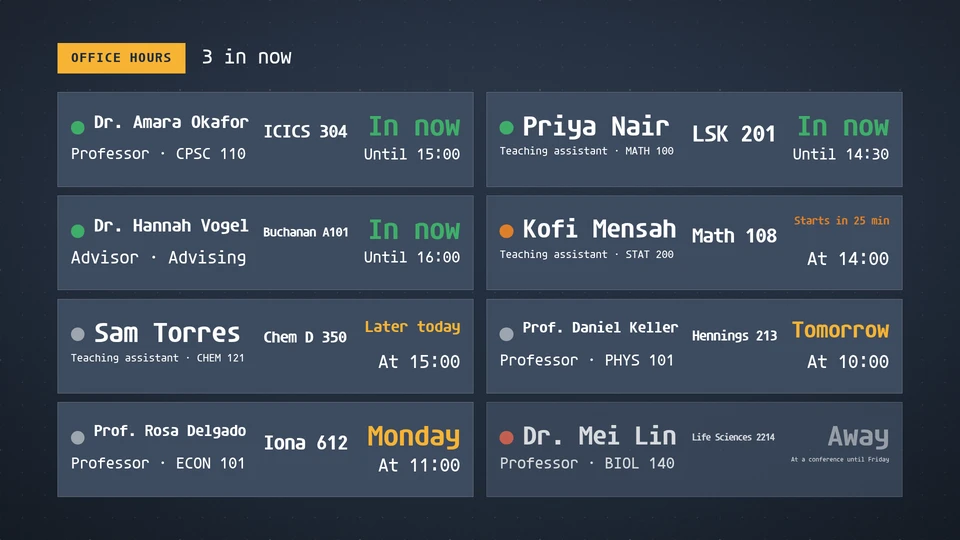


Views and forms
Views: canvas, corner, chip. Canvas forms: landscape, portrait, square, strip.
Card views, themes and publishing. Browse the gallery.
Data and privacy
This card uses its configured properties and live card data.
Only the hours and rooms the department publishes.
Properties
For theme, background, accent and position, see Common properties.
Set static properties in params. Bind data to a project card data key for live values; that document holds only dynamic properties. Without a data key, put the complete configuration in params. Nested rows describe the contents of their parent property.
Static properties
| Name | Type | Default | Values and limits | Description |
|---|---|---|---|---|
title | string | "Office hours" | maxLength: 40 | |
soonMinutes | integer | 60 | minimum: 5; maximum: 240 | Hours starting within this many minutes read as starting soon. |
sort | string | "status" | "status", "feed" | status lists who is in first, then who is next; feed keeps the order given. |
showCourse | boolean | true | ||
hour12 | boolean | false | ||
timeZone | string, null | null |
Dynamic properties
| Name | Type | Default | Values and limits | Description |
|---|---|---|---|---|
people | array | [] | maxItems: 24 | Faculty and teaching assistants with their weekly office hours. |
people[].name | string | minLength: 1; maxLength: 40; Required | ||
people[].role | string | maxLength: 30 | Professor, TA, advisor. | |
people[].course | string | maxLength: 30 | CPSC 110. | |
people[].room | string | maxLength: 24 | ICICS 304. | |
people[].hours | array | maxItems: 10 | The weekly office hours. | |
people[].hours[].days | array | maxItems: 7 | Weekdays; empty means every day. | |
people[].hours[].start | string | maxLength: 5; Required | HH:MM in the screen's zone. | |
people[].hours[].end | string | maxLength: 5; Required | ||
people[].away | boolean | false | Out for now whatever the hours say; note says why. | |
people[].note | string | maxLength: 40 | At a conference until Friday. |
Canvas example
Add this item to a playlist page’s primitives. Publish the playlist and assign a screen.
{
  "id": "office-hours",
  "primitive": "card",
  "card": "office-hours",
  "major": 1,
  "params": {
    "theme": "neomustard"
  },
  "rect": {
    "x": 0,
    "y": 0,
    "width": 1920,
    "height": 1080
  },
  "layer": 0,
  "content_fit": "fill",
  "data": "office-hours-main"
}
Write live data
Create this document before showing the card, then replace it to update the screen without republishing. Use the same project as the playlist. Supply your API authorization through the environment; see API authentication.
curl --request PUT "https://api.screenrig.ai/api/card-data/office-hours-main" \
  --header "Authorization: Bearer $SCREENRIG_TOKEN" \
  --header "ScreenRig-Project: $SCREENRIG_PROJECT" \
  --header "Content-Type: application/json" \
  --data '{"document":{"people":[]}}'