Category: Health. Tags: Leaderboards and standings, Numbers and metrics, Recognition, Events and venues.
Previews
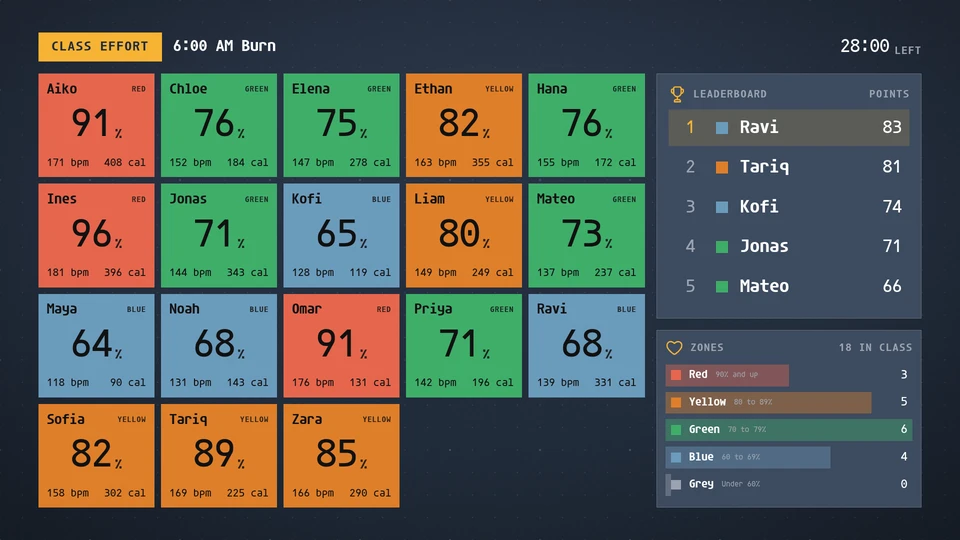
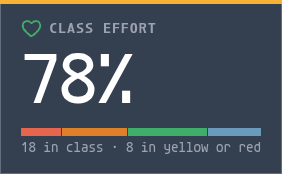

Views and forms
Views: canvas, corner, chip. Canvas forms: landscape, portrait, square, strip.
Card views, themes and publishing. Browse the gallery.
Data and privacy
Feed: screenrig.heartrate/v1.
Feed documents carry source attribution. The Player supplies the feed to the card.
Shows first names or nicknames only: never a surname, age, maximum heart rate beyond the percent or any health history, and the card stores nothing about a member.
Properties
For theme, background, accent and position, see Common properties.
Set static properties in params. Bind data to a project card data key for live values; that document holds only dynamic properties. Without a data key, put the complete configuration in params. Nested rows describe the contents of their parent property.
Static properties
| Name | Type | Default | Values and limits | Description |
|---|---|---|---|---|
title | string | "Class effort" | maxLength: 40 | |
defaultMaxHr | integer | 190 | minimum: 100; maximum: 230 | Maximum heart rate for a member with no maxHr or age. |
rankBy | string | "points" | "points", "calories", "effort" | What the leaderboard ranks: effort points, calories or percent of max. A member list with none of the first falls back to the next. |
leaders | integer | 5 | minimum: 3; maximum: 10 | Rows on the leaderboard (fewer when the space is short). |
perPage | integer | 24 | minimum: 4; maximum: 48 | Tiles on a page; a larger class takes further pages. |
pageSeconds | integer | 10 | minimum: 5; maximum: 60 | How long each page of tiles stays on screen. |
showBpm | boolean | true | Show beats per minute on each tile. | |
staleSeconds | integer | 45 | minimum: 5; maximum: 3600 | Readings older than this dim the tiles and show Updated 3 min ago. |
hour12 | boolean | false |
Dynamic properties
| Name | Type | Default | Values and limits | Description |
|---|---|---|---|---|
className | string | "" | maxLength: 60 | The class, for example 6:00 AM Burn, when the feed carries none. |
startedAt | string | "" | maxLength: 32 | When the class started, ISO 8601: the header counts up from it. |
endsAt | string | "" | maxLength: 32 | When the class ends, ISO 8601: the header counts down to it. |
members | array | [] | minItems: 0; maxItems: 120 | The members in the class. A feed (screenrig.heartrate/v1) wins when present; the data store supplies the same rows otherwise. |
members[].id | string | maxLength: 40 | An opaque member or strap id; never shown. | |
members[].name | string | maxLength: 60; Required | Only the first word is shown. | |
members[].nickname | string | maxLength: 20 | Shown instead of the name when present. | |
members[].hr | number | minimum: 0; maximum: 260 | Heart rate in beats per minute; 0 or missing is no signal. | |
members[].maxHr | number | minimum: 80; maximum: 240 | The member's maximum heart rate. | |
members[].age | number | minimum: 5; maximum: 110 | Used for 220 minus age when there is no maxHr; never shown. | |
members[].calories | number | minimum: 0; maximum: 5000 | ||
members[].points | number | minimum: 0; maximum: 5000 | Effort points (Myzone MEPs and similar). | |
updated | string | "" | maxLength: 32 | When the heart rates were read, ISO 8601 (data store only; a feed carries fetchedAt). |
Canvas example
Add this item to a playlist page’s primitives. Publish the playlist and assign a screen.
{
  "id": "heart-rate-wall",
  "primitive": "card",
  "card": "heart-rate-wall",
  "major": 1,
  "params": {
    "theme": "neomustard"
  },
  "rect": {
    "x": 0,
    "y": 0,
    "width": 1920,
    "height": 1080
  },
  "layer": 0,
  "content_fit": "fill",
  "data": "heart-rate-wall-main"
}
Write live data
Create this document before showing the card, then replace it to update the screen without republishing. Use the same project as the playlist. Supply your API authorization through the environment; see API authentication.
curl --request PUT "https://api.screenrig.ai/api/card-data/heart-rate-wall-main" \
  --header "Authorization: Bearer $SCREENRIG_TOKEN" \
  --header "ScreenRig-Project: $SCREENRIG_PROJECT" \
  --header "Content-Type: application/json" \
  --data '{"document":{"className":"","startedAt":"","endsAt":"","members":[],"updated":""}}'