Category: Schools. Tags: Schools and campuses, Queues and waits.
Previews
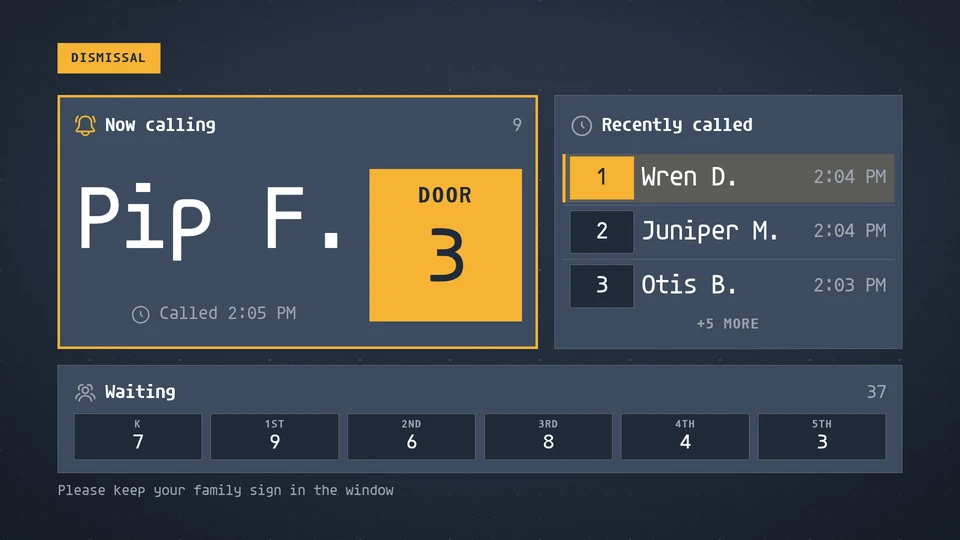
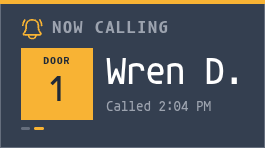

Views and forms
Views: canvas, corner, chip. Canvas forms: landscape, portrait, square, strip.
Card views, themes and publishing. Browse the gallery.
Data and privacy
This card uses its configured properties and live card data.
Shows exactly the names the school sends (first name and last initial); it never adds, expands or looks up a name, and shows none once dismissal ends.
Properties
For theme, background, accent and position, see Common properties.
Set static properties in params. Bind data to a project card data key for live values; that document holds only dynamic properties. Without a data key, put the complete configuration in params. Nested rows describe the contents of their parent property.
Static properties
| Name | Type | Default | Values and limits | Description |
|---|---|---|---|---|
title | string | "Dismissal" | maxLength: 40 | |
doorLabel | string | "Door" | maxLength: 12 | The small word above a short door or cone number, for example Door or Cone. A longer value such as Front gate shows as written. |
count | integer | 6 | minimum: 1; maximum: 10 | How many earlier calls the recent list shows. |
expireMinutes | integer | 20 | minimum: 0; maximum: 240 | A call leaves the board this many minutes after calledAt. 0 keeps it until the data removes it. |
chime | boolean | true | The host plays the call cue; the card highlights a call made under 30 s ago. | |
hour12 | boolean | true |
Dynamic properties
| Name | Type | Default | Values and limits | Description |
|---|---|---|---|---|
calls | array | [] | minItems: 0; maxItems: 60 | Students called, newest first, by first name and last initial. With calledAt the newest time leads; calls without one keep their order after the timed ones. |
calls[].name | string | minLength: 1; maxLength: 60; Required | The student as the school sends it: first name and last initial, for example Maya R. The card never adds, expands or looks up names. | |
calls[].door | string | "" | maxLength: 20 | The door or cone, for example 3 or Cone B. |
calls[].calledAt | string | "" | maxLength: 40 | ISO 8601 instant the student was called. Drives the fresh highlight, the newest-first order and the expiry. |
waiting | array | [] | minItems: 0; maxItems: 8 | Cars or students still waiting, by grade, as supplied. Omit it to hide the strip. |
waiting[].grade | string | minLength: 1; maxLength: 12; Required | ||
waiting[].count | integer | minimum: 0; maximum: 999; Required | ||
ended | boolean | false | True once dismissal is over: the board shows a calm closing message and no names. | |
message | string | "" | maxLength: 120 | A line for the foot of the board; in the closed and waiting states it replaces the default sentence. |
Canvas example
Add this item to a playlist page’s primitives. Publish the playlist and assign a screen.
{
  "id": "dismissal",
  "primitive": "card",
  "card": "dismissal",
  "major": 1,
  "params": {
    "theme": "neomustard"
  },
  "rect": {
    "x": 0,
    "y": 0,
    "width": 1920,
    "height": 1080
  },
  "layer": 0,
  "content_fit": "fill",
  "data": "dismissal-main"
}
Write live data
Create this document before showing the card, then replace it to update the screen without republishing. Use the same project as the playlist. Supply your API authorization through the environment; see API authentication.
curl --request PUT "https://api.screenrig.ai/api/card-data/dismissal-main" \
  --header "Authorization: Bearer $SCREENRIG_TOKEN" \
  --header "ScreenRig-Project: $SCREENRIG_PROJECT" \
  --header "Content-Type: application/json" \
  --data '{"document":{"calls":[],"waiting":[],"ended":false,"message":""}}'