# screenRIG for Omarchy
> Canonical HTML: https://screenrig.ai/omarchy
screenRIG for Omarchy puts the signage screens around you on your desktop. Watch every screen from the bar, cast your desktop or one app window live to the TVs on your network, and ask your coding agent to change what plays.
Updated November 10, 2026.
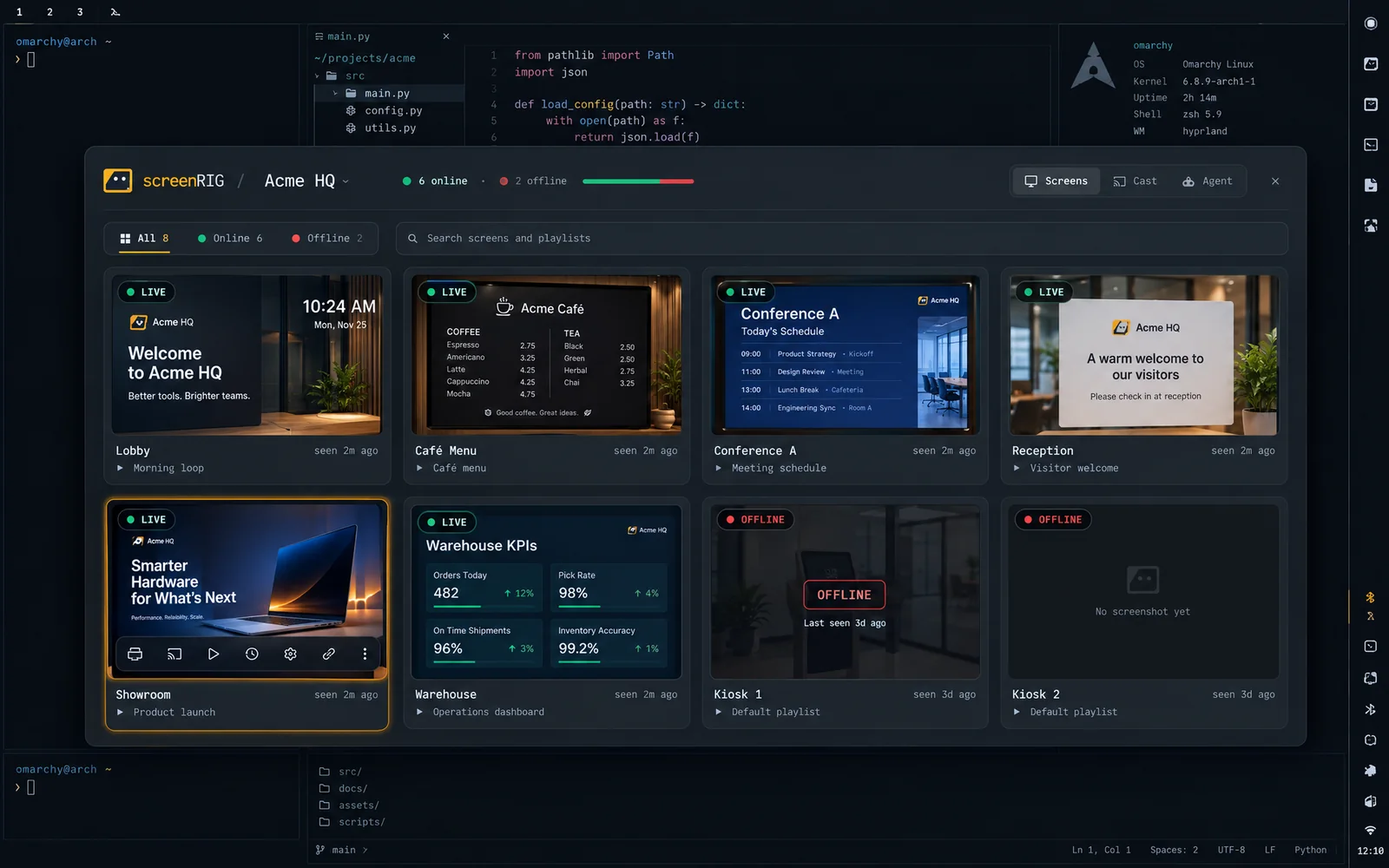
*The Screens tab: every screen with its latest screenshot, what it plays and when it was last seen.*
## Install
```sh
omarchy plugin add https://github.com/screenrig/omarchy --enable
```
The plugin uses the screenRIG CLI's sign-in. [Quickstart](https://screenrig.ai/docs/start.md) installs the official plugin for your agent, which bundles the CLI; run `screenrig login` once and the Omarchy plugin picks it up. It needs Omarchy 4.5 and Python 3. The source is MIT licensed at [github.com/screenrig/omarchy](https://github.com/screenrig/omarchy).
## Every screen from the bar
The screenRIG mark sits in your bar and shows a red dot when a screen drops or a cast is live. Click it for the panel. The Screens tab lists every screen with its latest screenshot, its playlist and when it was last seen. Reload a screen, switch its playlist, turn its display off, override it for a while, take a fresh screenshot, restart it or open it in the dashboard.
A project switcher sits in the panel header. The Omarchy menu gets a screenRIG section with every screen and playlist, searchable, and notifications tell you when a screen goes offline or comes back, a publish reaches its screens, an ad booking needs review, or a live cast starts or stops.
## Cast your desktop or a window live
The Cast tab shows live thumbnails of your desktop and every app window. Pick one with the arrow keys and Return, tick the screens and go live. The cast streams to the Android and Linux Players on your network, for 15 minutes, 1 hour, 4 hours or until you stop it.
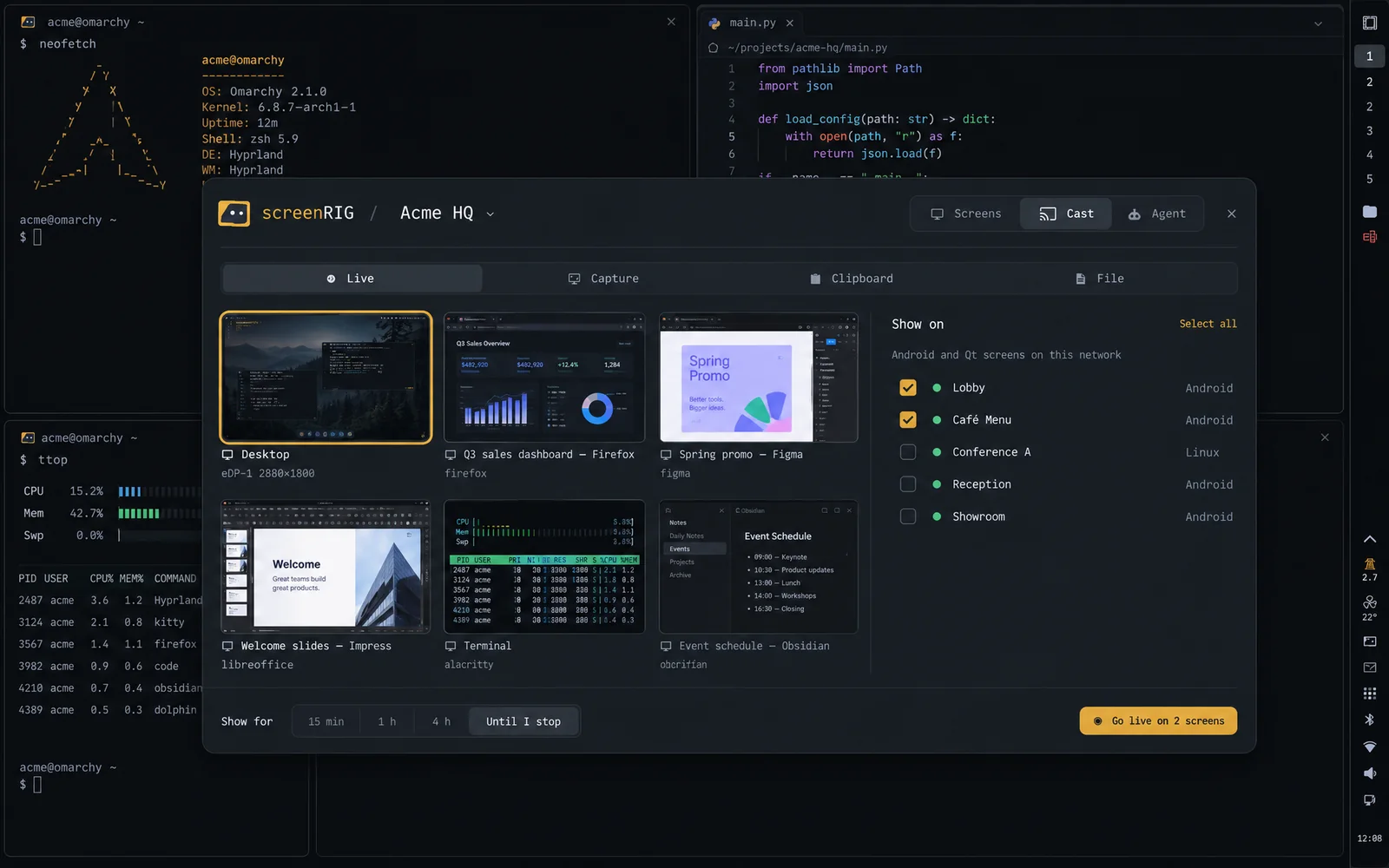
*Pick the desktop or a window, tick the screens and go live.*
While it runs, the panel shows what is live, on which screens and for how long, with one button to stop. Middle-click the bar mark to stop from anywhere. For a quick share, right-click the mark to capture a region, or send the clipboard (a link or an image) or a file to screens for 5 to 60 minutes.
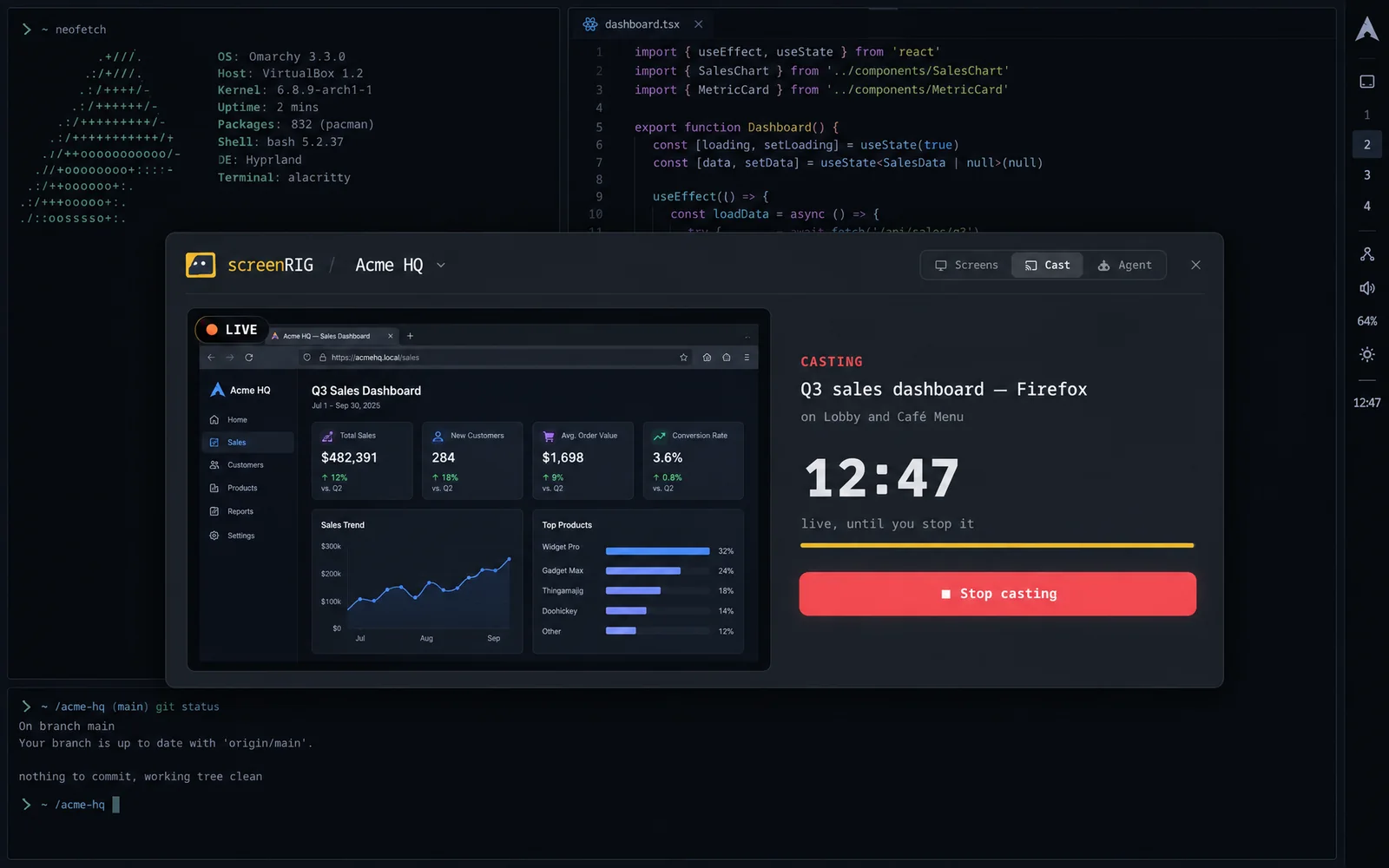
*A window live on the Lobby and Café Menu screens.*
## Ask your agent
The Agent tab is a chat with your Omarchy default agent, Claude Code or Codex, with the screenRIG skill loaded. Tell it what to put on which screen and for how long; it builds the content, publishes it, checks the screen and keeps the conversation across messages.
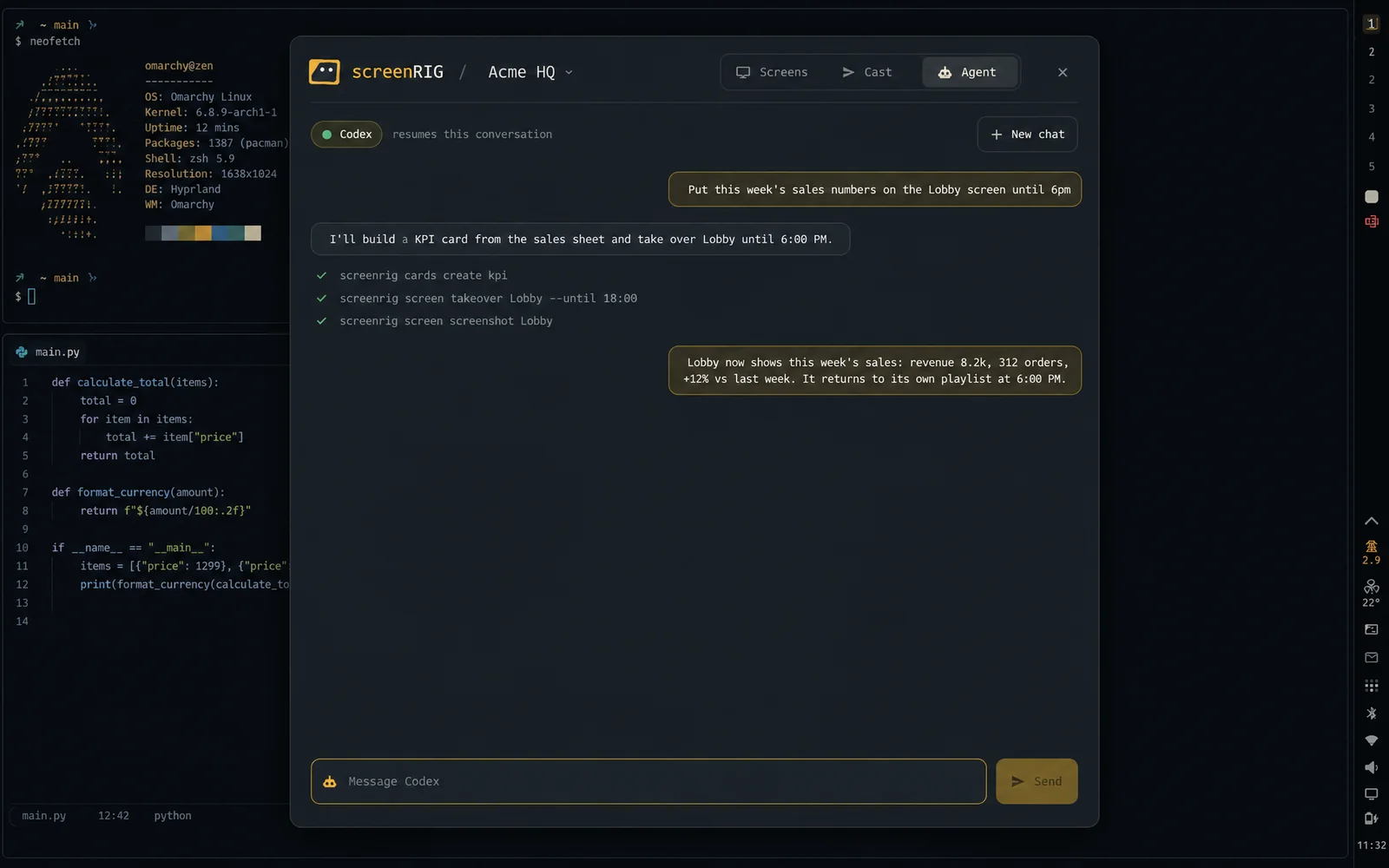
*One sentence puts this week's sales on the Lobby screen until 6 PM.*
## What it changes on your system
On first load the plugin links two commands into `~/.local/bin`, adds a marked block of screenRIG rows to the Omarchy menu (your own rows stay), two desktop entries and a theme hook. Live casting asks first: after you press Allow, it opens TCP 8554 to your local network when ufw is on, and for window casts it answers the screen-share picker for the window you chose, running your previous picker for every other share. The first live cast downloads mediamtx and checks it against its published SHA-256.
One command undoes all of it and removes the plugin:
```sh
screenrig-omarchy teardown && omarchy plugin remove screenrig.omarchy
```
## Related
- [Digital Signage Apps, Extensions and Plugins](https://screenrig.ai/tools.md): screenRIG tools for the computer and phone you work on: a Chrome and Firefox extension, the iPhone, iPad and Apple Watch app, and an Omarchy plugin.
- [Quickstart: Digital Signage with Your AI Agent](https://screenrig.ai/docs/start.md): Install the official plugin with your AI agent, then pair a Player and publish your first screen. Start in a chat app or a terminal agent.
- [Supported Players and Setup](https://screenrig.ai/docs/players.md): Install the screenRIG Player on your screen, pair it with your agent, and compare content types, streams and device controls by platform.
- [Send a Tab to TV or Digital Signage: Browser Extension](https://screenrig.ai/docs/browser-extension.md): Send a browser tab to a TV or signage screen in one click with the screenRIG add-on for Chrome and Firefox.
- [iPhone, iPad and Apple Watch App for Screens](https://screenrig.ai/iphone-app.md): The screenRIG app for iPhone, iPad and Apple Watch shows every screen live and lets you edit playlists, approve changes and answer alerts.
## More topics
- [Headless Digital Signage (API-First Screens)](https://screenrig.ai/headless-digital-signage.md): Headless digital signage: a CI pipeline updates a TV through the API with curl, with no dashboard open and no one watching.
- [Digital Signage REST API, Webhooks and SDK](https://screenrig.ai/developers.md)
- [Free Digital Signage Software and App](https://screenrig.ai/free-digital-signage.md): Free digital signage software with unlimited screens and no watermark, plus a Player app for TVs, sticks, Raspberry Pi and PCs. See what paid plans add.
- [AI Digital Signage Software Run by Your Agent](https://screenrig.ai/digital-signage/ai.md): AI digital signage agents make content, publish it to TVs and keep it current. Use Claude, ChatGPT, Gemini or Grok, with example requests and real runs.
- [All digital signage](https://screenrig.ai/digital-signage.md): Digital signage software your AI agent runs: pair a TV, stick, Raspberry Pi or PC, say what to show and the agent builds and checks it.
[Start free](https://screenrig.ai/docs/start.md). screenRIG is free.