# Election results card
> Canonical HTML: https://screenrig.ai/docs/cards/election-results/
Election night results: each race with its candidates ranked by votes, the share, the votes and the percent reporting, and whether it is called or who is leading.
Category: Public information. Tags: Scoreboards, Leaderboards and standings, News and announcements, Events and venues.
## Previews
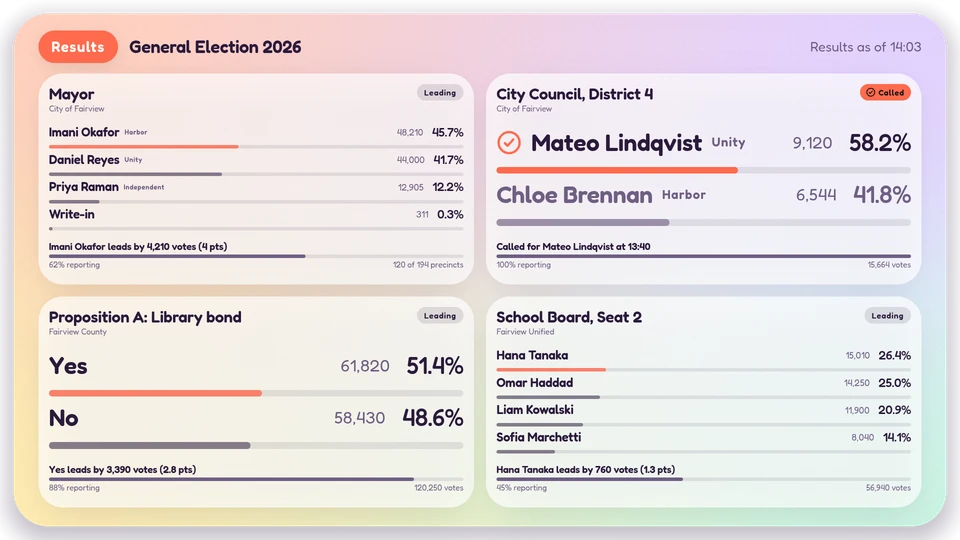
Canvas

Corner

Chip
## Views and forms
Views: canvas, corner, chip. Canvas forms: landscape, portrait, square, strip.
[Card views, themes and publishing](/docs/cards/). [Browse the gallery](/apps/#cards).
## Data and privacy
Feed: `screenrig.election/v1`.
Feed documents carry source attribution. The Player supplies the feed to the card.
## Properties
For theme, background, accent and position, see [Common properties](/docs/cards/#common-properties).
Set static properties in `params`. Bind `data` to a project card data key for live values; that document holds only dynamic properties. Without a data key, put the complete configuration in `params`. Nested rows describe the contents of their parent property.
### Static properties
| Name | Type | Default | Values and limits | Description |
| --- | --- | --- | --- | --- |
| `title` | string | `"Results"` | maxLength: `40` | |
| `layout` | string | `"grid"` | `"grid"`, `"spotlight"` | Several races at once, or one race at a time with every candidate. |
| `perPage` | integer | `4` | minimum: `1`; maximum: `8` | Races on a page (grid layout); further races take the next page. |
| `pageSeconds` | integer | `12` | minimum: `5`; maximum: `60` | How long each page, or each race in the spotlight, stays on screen. |
| `maxCandidates` | integer | `4` | minimum: `2`; maximum: `8` | Candidates listed in a race; the rest share one Others line. |
| `showVotes` | boolean | `true` | | Show vote counts beside the shares. |
| `showParty` | boolean | `true` | | Show each candidate's party as text. |
| `staleMinutes` | integer | `30` | minimum: `1`; maximum: `1440` | |
| `hour12` | boolean | `false` | | |
### Dynamic properties
| Name | Type | Default | Values and limits | Description |
| --- | --- | --- | --- | --- |
| `electionName` | string | `""` | maxLength: `80` | The election, for example General Election 2026, when the feed carries none. |
| `races` | array | `[]` | minItems: `0`; maxItems: `40` | The races. A feed (screenrig.election/v1) wins when present; the data store supplies the same rows otherwise. |
| `races[].id` | string | | maxLength: `40` | |
| `races[].title` | string | | minLength: `1`; maxLength: `80`; Required | The contest, for example Mayor. |
| `races[].jurisdiction` | string | | maxLength: `60` | Where, for example City of Fairview. |
| `races[].reportingPct` | number | | minimum: `0`; maximum: `100` | Percent of precincts reporting. |
| `races[].precincts` | object | | additionalProperties: `false` | |
| `races[].precincts.reporting` | number | | minimum: `0` | |
| `races[].precincts.total` | number | | minimum: `0` | |
| `races[].status` | string | | `"open"`, `"called"`, `"recount"`, `"runoff"`, `"unopposed"` | Called when the race has been called; a candidate with winner true calls it as well. |
| `races[].calledAt` | string | | maxLength: `32` | When the race was called, ISO 8601. |
| `races[].featured` | boolean | | | Lead the corner and chip with this race. |
| `races[].candidates` | array | | minItems: `0`; maxItems: `40`; Required | |
| `races[].candidates[].name` | string | | maxLength: `60`; Required | |
| `races[].candidates[].party` | string | | maxLength: `24` | Shown as text; no colour comes from it. |
| `races[].candidates[].votes` | number | | minimum: `0` | |
| `races[].candidates[].pct` | number | | minimum: `0`; maximum: `100` | Share of the vote; worked out from votes when absent. |
| `races[].candidates[].winner` | boolean | | | |
| `races[].candidates[].incumbent` | boolean | | | |
| `updated` | string | `""` | maxLength: `32` | When the results were last updated, ISO 8601 (data store only; a feed carries fetchedAt). |
## Canvas example
Add this item to a playlist page’s `primitives`. [Publish the playlist and assign a screen](/docs/cards/#publish-a-card-canvas).
```json
{
"id": "election-results",
"primitive": "card",
"card": "election-results",
"major": 1,
"params": {
"theme": "neomustard"
},
"rect": {
"x": 0,
"y": 0,
"width": 1920,
"height": 1080
},
"layer": 0,
"content_fit": "fill",
"data": "election-results-main"
}
```
## Write live data
Create this document before showing the card, then replace it to update the screen without republishing. Use the same project as the playlist. Supply your API authorization through the environment; see [API authentication](/docs/authentication/).
```console
curl --request PUT "https://api.screenrig.ai/api/card-data/election-results-main" \
--header "Authorization: Bearer $SCREENRIG_TOKEN" \
--header "ScreenRig-Project: $SCREENRIG_PROJECT" \
--header "Content-Type: application/json" \
--data '{"document":{"electionName":"","races":[],"updated":""}}'
```